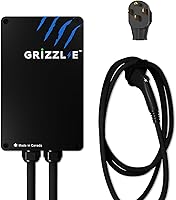
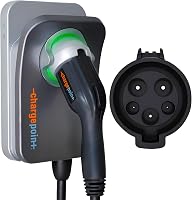
7 Best Home EV Chargers (October 2026)
The best best home EV chargers include the Grizzl-E Classic 40A NEMA 14-50 Charger for straightforward overnight charging, the ChargePoint HomeFlex NEMA 14-50 Charger for connected garage routines, and the ChargePoint HomeFlex 50A Hardwired Charger for permanent smart installations.
On this page (7 sections)
The best home EV charger for most buyers with a suitable outlet is the Grizzl-E Classic 40A NEMA 14-50 Charger. Choose ChargePoint HomeFlex if app controls shape your charging routine, or Emporia Pro if managing charging alongside household electrical demand is the main concern.
Start with the car, circuit and parking spot. The right charger replaces the energy you use between drives, reaches the charge port comfortably and works within your home's electrical capacity.
Our overview of Level 1 and Level 2 home charging explains the basic choices. Below, ModestMeasure compares 7 options and shows when each makes sense.
Our picks at a glance
-
1
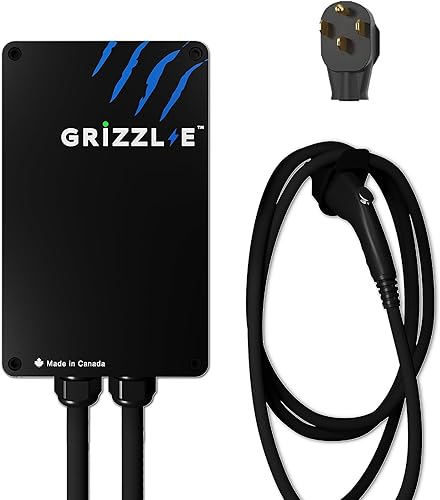 Best for straightforward overnight charging
Grizzl-E Classic 40A NEMA 14-50 Charger
9.1/10 our score
See it on Amazon -
2
 Best for connected garage routines
ChargePoint HomeFlex NEMA 14-50 Charger
8.8/10 our score
See it on Amazon -
3
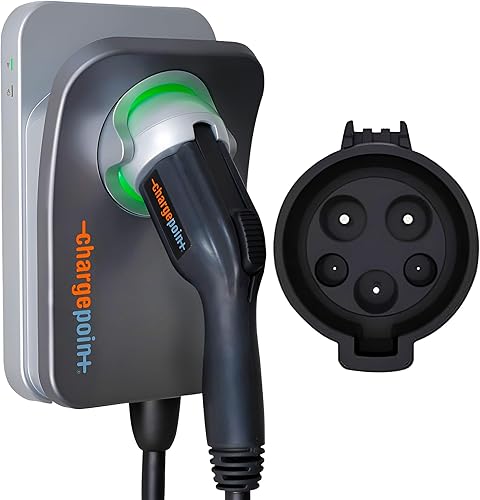 Best for permanent smart installations
ChargePoint HomeFlex 50A Hardwired Charger
8.7/10 our score
See it on Amazon
- 4
 Check it
EVIQO 48A Hardwired J1772 Charger
Best for outdoor parking spots - 5
 Check it
Emporia Pro 48A Hardwired Charger
Best for busy electrical panels - 6
 Check it
Wallbox Pulsar Plus 40A Charger
Best for tight garage walls - 7
 Best for shared driveway accessCheck it
How we chose the best home EV chargers
The best home EV chargers combine a suitable electrical connection with convenient everyday use. We compared output settings, cable reach, weather protection, charging controls and installation needs.
We favored clear buyer fits over the highest amp number. A driver charging overnight from an approved outlet has different needs from someone adding a permanent driveway charger or managing a busy electrical panel.
Installation can change which option makes sense, even before you compare features. Review the installation cost factors for a Level 2 charger so your plan includes wiring, mounting and any panel work.
| Product | Best for | Setup | Output | Cable | Our score |
|---|---|---|---|---|---|
| Grizzl-E Classic 40A NEMA 14-50 Charger | straightforward overnight charging | NEMA 14-50 plug | 16A to 40A adjustable | 24 ft | 9.1 |
| ChargePoint HomeFlex NEMA 14-50 Charger | connected garage routines | NEMA 14-50 plug | Up to 40A | 23 ft | 8.8 |
| ChargePoint HomeFlex 50A Hardwired Charger | permanent smart installations | Hardwired | Up to 50A | 23 ft | 8.7 |
| EVIQO 48A Hardwired J1772 Charger | outdoor parking spots | Hardwired | 48A on a dedicated 60A circuit | 25 ft | 8.4 |
| Emporia Pro 48A Hardwired Charger | busy electrical panels | Hardwired | Up to 48A | 25 ft | 8.1 |
| Wallbox Pulsar Plus 40A Charger | tight garage walls | NEMA 14-50 plug | 40A | 25 ft | 7.5 |
| Grasside 40A Plug-In Charger | shared driveway access | NEMA 14-50 plug | Up to 40A | 25 ft | 6.9 |
Which home EV charger fits your setup?
Choose Grizzl-E for straightforward plug-in charging, ChargePoint for connected routines, or Emporia Pro for household load management. EVIQO, Wallbox and Grasside serve more specific parking, space and access needs.
Best home EV charger for straightforward use: Grizzl-E Classic
Grizzl-E Classic 40A NEMA 14-50 Charger: Best for straightforward overnight charging
- NEMA 14-50 plug
- Adjustable 16A, 24A, 32A or 40A output
- 24 ft cable
- IP67 water resistance
Choose Grizzl-E for a plug-in charging routine with current settings matched to your circuit. Its metal enclosure and weather protection suit a garage or an approved outdoor location.
Pros
- Four current settings
- Built-in GFCI
- Metal enclosure
Cons
- Current adjustment does not replace a circuit assessment
The Grizzl-E Classic suits drivers who want an approved plug-in installation and a simple overnight routine. Its 16A, 24A, 32A and 40A settings let the installer match output to the available circuit.
Grizzl-E specifies those settings for 20A, 30A, 40A and 50A breakers, respectively. Selecting a lower current does not make unsuitable wiring or an old receptacle ready for EV charging.
The metal enclosure, 24 ft cable and indoor/outdoor design make it useful for a garage or an approved exterior mounting point. Grizzl-E states that it is UL certified, with IP67 water protection and built-in GFCI protection.
Buy it when the core job is replenishing your car while it sits at home. Skip it if your main requirement is app-based energy records, remote controls or coordination with household demand.
Before choosing this connection, read whether an EV charger can use a NEMA 14-50 outlet. An outlet that accepts the plug still needs a circuit assessment.
ChargePoint HomeFlex NEMA 14-50 Charger
ChargePoint HomeFlex NEMA 14-50 Charger: Best for connected garage routines
- NEMA 14-50 plug
- Up to 40A plug-in output
- J1772 connector
- ChargePoint app controls
This HomeFlex pairs a plug-in connection with app controls, reminders and charging information. It suits drivers who want home charging controls alongside ChargePoint station-finding tools.
Pros
- App controls and charging information
- Smart-home connections
- Cold-resistant cable
Cons
- Requires a suitable 240V receptacle
- J1772 connection needs an adapter for Tesla vehicles
The plug-in HomeFlex suits drivers who want charging information, reminders and smart-home connections in their routine. The ChargePoint app also provides station-finding tools, which is useful if you already plan public charging through it.
This version delivers up to 40A through its plug, despite the wider HomeFlex range including higher-output configurations. It needs a suitable 240V NEMA 14-50 receptacle on a 40A or 50A circuit, with output configured accordingly.
Its 23 ft cold-resistant cable deserves a careful reach check if your inlet sits at the far end of the car. ChargePoint states that the unit is UL certified for indoor or outdoor installation by an electrician.
Choose it when you have a suitable outlet and will use the connected features. Skip this version if you're planning a permanent direct connection anyway; the hardwired HomeFlex below better matches that job.
After installation, set up the app and check that the charging current matches the installer's configuration.
ChargePoint HomeFlex 50A Hardwired Charger
ChargePoint HomeFlex 50A Hardwired Charger: Best for permanent smart installations
- Hardwired connection
- Up to 50A output
- J1772 connector
- ChargePoint app controls
Choose this HomeFlex for a permanent connection with adjustable output and ChargePoint app features. Your electrician must match the selected current to the wiring, circuit and available electrical capacity.
Pros
- App controls and reminders
- Adjustable charging current
- Cold-resistant cable
Cons
- Professional electrical installation required
- Wi-Fi is needed for some functions
The hardwired HomeFlex suits a permanent installation where you want ChargePoint controls without a wall receptacle. Its adjustable output reaches 50A, provided the electrical installation and vehicle support the chosen setting.
Choose it for a long-term parking location, particularly if you're already arranging new wiring. Hardwiring removes the plug-and-receptacle connection, though the installation still needs correct sizing and commissioning.
ChargePoint includes a cold-resistant cable and states that the unit is UL certified for indoor or outdoor use. Some app functions and troubleshooting steps require Wi-Fi, so check coverage at the mounting point before installation day.
Skip it if your vehicle cannot use the extra output and an approved existing outlet already meets your needs. The higher ceiling alone is not a reason to arrange more electrical work.
Have the electrician explain the configured limit and leave you the installation details. Our guide to hardwired versus plug-in EV chargers helps you weigh the connection choice.
EVIQO 48A Hardwired J1772 Charger
EVIQO 48A Hardwired J1772 Charger: Best for outdoor parking spots
- Hardwired installation
- Up to 48A on a dedicated 60A, 240V circuit
- 25 ft cable
- IP66 and NEMA 4 housing
EVIQO combines a hardwired connection with weather protection and a glow-in-the-dark connector holster. It suits a driveway installation where cable storage and finding the connector after dark matter.
Pros
- App charging controls and energy tracking
- Glow-in-the-dark holster
- Side reset button
Cons
- Professional installation required
- App connection requires 2.4 GHz Wi-Fi
EVIQO suits driveway charging where a permanent connection, weather protection and easy connector storage matter. Its 25 ft cable gives placement flexibility, while the glow-in-the-dark holster helps you find the docking point after dark.
The normal maximum configuration supplies 48A from a dedicated 60A, 240V circuit. EVIQO also describes a separate 50A configuration on a dedicated 70A circuit; let the installer confirm and configure any such change.
EVIQO states that the enclosure has IP66 and NEMA 4 protection. The app supports charge control, current adjustment and energy tracking through a 2.4 GHz home Wi-Fi network.
Choose it if those outdoor-use details fit your parking arrangement and you want a hardwired smart charger. Skip it if you're seeking an outlet-based unit that can be removed without disconnecting fixed wiring.
The side reset button allows a restart without opening the enclosure. If a fault returns after following the manufacturer's recovery steps, stop repeating resets and have the cause checked.
Emporia Pro 48A Hardwired Charger
Emporia Pro 48A Hardwired Charger: Best for busy electrical panels
- 48A hardwired setup
- J1772 connector
- Vue home energy monitor included
- PowerSmart load balancing
Emporia Pro includes a Vue home energy monitor and PowerSmart load management. Choose it when coordinating charging with household electrical demand matters more than keeping the installation simple.
Pros
- Home energy monitor included
- Automatic charging load management
- App scheduling and usage tracking
Cons
- Monitor adds installation and setup work
- Load management needs professional assessment and configuration
Emporia Pro suits homes where charging must share electrical capacity with other major loads. The included Vue monitor and PowerSmart software manage charging demand while providing a view of household energy use.
Emporia says this system can help avoid a panel upgrade by adjusting charging to available capacity. Have an electrician assess whether that approach suits your home before treating an upgrade as unnecessary.
This is the 48A hardwired J1772 version, with a 25 ft cable. The app adds schedules and real-time usage tracking, making it useful for drivers who want to see how car charging fits into broader electricity use.
Choose it when load management solves a real installation problem or home energy monitoring is something you'll use. Skip it if a simpler charger meets your needs and you don't want the added monitor installation and configuration.
Emporia recommends professional installation. Ask the installer to explain how charging responds when household demand rises, so a reduced charging rate doesn't come as a surprise.
Wallbox Pulsar Plus 40A Charger
Wallbox Pulsar Plus 40A Charger: Best for tight garage walls
- 40A plug-in version
- J1772 connector
- Wi-Fi and Bluetooth
- Indoor and outdoor use
The compact Pulsar Plus suits garages where wall space is limited but app control still matters. This is the 40A plug-in version, with Wi-Fi and Bluetooth connectivity.
Pros
- Compact enclosure
- App controls and scheduling
- Wallbox states UL and Energy Star certification
Cons
- Tesla adapter is not included
- Cable storage needs space beyond the enclosure
Wallbox Pulsar Plus suits a garage with limited mounting space and a need for app control. Its enclosure measures 3.9 in deep, 7.8 in wide and 7.9 in high, leaving more wall area free around the unit.
The compact box still needs room for its cable, connector and the required installation clearances. Mark the full storage area on the wall before deciding it will fit beside shelves or a garage door track.
This is the 40A NEMA 14-50 version, with Wi-Fi and Bluetooth for charging control and scheduling. Wallbox states that it has a NEMA Type 4 enclosure for outdoor use and recommends installation by a licensed electrician.
Choose it when the physical footprint matters and you want connected controls. Skip it if the cable route forces you to stretch across a walkway, since a small enclosure cannot solve poor placement.
Tesla drivers need a compatible J1772 adapter, which is not included. Plan a protected place to store any adapter with the connector.
Grasside 40A Plug-In Charger
Grasside 40A Plug-In Charger: Best for shared driveway access
- NEMA 14-50 plug
- J1772 connector
- App, RFID and plug-and-charge modes
- Grasside states ETL certification to UL-2594 standards
Grasside offers RFID and app authorization for parking areas where charging access needs control. Enable plug-and-charge mode through the app if you prefer charging without authorization each time.
Pros
- Three charging access modes
- Adjustable current
- IP65 weather protection
Cons
- App Wi-Fi requires 2.4 GHz
- Plug-and-charge mode needs initial app setup
Grasside suits a shared driveway or another parking area where you want to control charging access. It offers RFID authorization, app control and plug-and-charge modes, giving you a choice between restricted access and everyday convenience.
Initial setup uses Bluetooth pairing followed by connection to a 2.4 GHz Wi-Fi network. Plug-and-charge must be enabled in the app before you can charge without app or RFID authorization.
It needs an EV-rated NEMA 14-50 receptacle on a dedicated 50A circuit. Grasside states that it has ETL certification to UL-2594 standards and IP65 weather protection, with a metal enclosure and a 25 ft cable.
Choose it when access control is a real need, rather than an extra feature you'll never use. Skip it if you want the least setup work and have no reason to authorize individual charging sessions.
Keep the RFID card somewhere accessible if that's your chosen mode. Have the electrician determine all required circuit protection rather than changing protection yourself to address nuisance trips.
How do you choose a home EV charger?
Choose by daily energy needs, vehicle compatibility, electrical capacity and cable route, in that order. Smart features help only after the charger fits those basics.
Match charging speed to your parked time
Buy enough charging capacity to recover your normal daily use during the hours you're home. A large battery does not mean you need the fastest charger, because most nights you're replacing only part of its energy.
Compare your typical day with your longest routine day, such as a commute followed by evening errands. A charger that comfortably covers both is more useful than one chosen around an occasional road trip.
Your car's onboard AC charging limit can cap speed below the charger's maximum. Check that limit before paying for electrical work intended only to raise charging output.
For a rough power comparison, multiply volts by amps and divide by 1,000 to get kilowatts. At 240V, 32A is about 7.7 kW; actual energy reaching the battery is lower because charging has losses.
Confirm the port and any adapter
Check the actual vehicle inlet and the vehicle manual before choosing a connector. Brand name alone is not enough to identify the charging port on every model.
The named J1772 models here connect directly to J1772-equipped vehicles. Vehicles with a different inlet need an approved compatible adapter or a charger with the matching connector.
Check adapter compatibility, current limits and vehicle guidance together. Our J1772 versus NACS guide explains the connector difference without assuming every vehicle from one brand has the same port.
Check capacity before choosing maximum amps
Have an electrician assess the panel, circuit, wiring and charging location before selecting an output setting. Empty breaker spaces alone do not show how much electrical capacity is available.
EV charging can run for hours, so the circuit must suit that sustained load. Turning down the charger in an app is not a substitute for correctly sized wiring and a properly configured installation.
Ask for the approved charging limit in writing and keep it with the charger instructions. Our guide to EV charger breaker sizing explains why breaker capacity and charging current are different numbers.
Measure the usable cable route
Measure from the planned charger mount to the inlet with the car parked normally. Follow the route the cable will actually take around the vehicle, rather than measuring a straight line through it.
Allow slack at the connector and room to walk without stepping over the cable. Check a second parking position too if you sometimes reverse in or share the space with another vehicle.
The cables here span 23 ft to 25 ft, so placement can matter more than their small length differences. Move the planned mounting point if the route is marginal.
Don't solve a reach problem with an ordinary extension cord. Read our guide to extension cords and EV charging before trying to extend the power connection.
Choose outdoor placement as a complete installation
All 7 picks support outdoor use under their installation instructions. The charger, wiring, receptacle if used, and mounting arrangement must all suit the location.
Weather protection does not mean the equipment can sit in standing water or ignore installation clearances. Choose a spot that keeps the connector off the ground and avoids vehicle impact.
For plug-in units, the outlet arrangement needs particular attention outdoors. Our home EV charger installation safety guide covers the checks to discuss with your electrician.
Pay for smart features you'll use
Choose connected controls if you need schedules, energy records, remote access or household load management. If your vehicle already schedules charging reliably, another scheduling app may add little to your routine.
Check your electricity plan before setting an off-peak schedule. Savings depend on your actual tariff, and a shorter cheap-rate window may affect how much charging capacity you need.
Confirm Wi-Fi coverage where the charger will sit, with the garage door in its usual position. Bluetooth and Wi-Fi serve different roles, so don't assume support for one replaces every function of the other.
How should you set up a home EV charger?
Set up the electrical installation first, then confirm current limits, connectivity and charging schedules. A useful handover leaves you knowing how to charge, stop a session and respond to a fault.
Before installation day, agree on the mounting point and show the electrician your normal parking position. Include the connector holster, cable loop and any cabinet or door movement in that plan.
For a smart unit, have your network details and vehicle information ready. If a monitor or load-management system is included, allow time for its installation and configuration too.
Ask the installer to confirm the final output setting and explain whether you should ever change it. Record that limit so a future app reset or vehicle change doesn't lead to an unsuitable setting.
During the first normal charging session, confirm that the vehicle accepts power and that the cable sits without tension. Check that you can close doors and move around the car without disturbing the connector.
Use one main charging schedule initially, either in the car or charger. Overlapping schedules can leave a car waiting for permission from one system after the other has stopped its session.
Set the vehicle's routine battery target according to its manual. The charger supplies power, while the vehicle controls its battery charging limits.
How do you care for a home EV charger?
Keep the connector clean, the cable supported and the equipment free from visible damage. Follow the manufacturer's cleaning and inspection instructions rather than opening the enclosure yourself.
Return the connector to its holster after use. Loose cable loops keep the lead off the driving path and avoid sharp bends or strain where it enters the unit.
Before plugging in, look for cracked insulation, bent or dirty contacts, damaged housings and signs of overheating. Stop using equipment with damage, scorching or a burning smell and arrange professional help.
For plug-in chargers, repeated unplugging adds wear to the receptacle. Leave a permanent home setup connected unless the instructions or a service need call for disconnection.
Never pull the charging connector out by its cable. End the session and release the connector as directed by the vehicle and charger instructions.
If a breaker trips repeatedly, don't keep resetting it or increase its capacity. Have the installation and equipment checked before charging again.
Which mistakes make a home charger harder to live with?
The most costly mistakes are choosing output before checking the home, mounting without measuring and treating app settings as electrical safeguards. Resolve those issues before comparing small feature differences.
- Buying maximum amps by default: Your car may accept less power, or your parked time may make the extra capacity unnecessary.
- Reusing an unchecked outlet: A matching socket does not confirm wiring condition, circuit capacity or suitability for sustained charging.
- Measuring only to the bumper: The cable must reach the inlet with slack, even when the car isn't parked in exactly the same spot.
- Assuming an adapter is included: Confirm the exact connector and any needed adapter before installation day.
- Ignoring household demand: A charger shares the home's supply with heating, cooking and other loads, even when it has a dedicated branch circuit.
- Changing protection to stop trips: Built-in charger protection does not authorize removing protection required for the installation.
- Forgetting everyday storage: A charger is less convenient if its cable blocks a doorway or lies where tires can roll over it.
A future vehicle can change your connector or power needs, but planning does not require maximum output now. Ask the installer which parts of the electrical work could support a later change without repeating the whole job.
Which home EV charger should you buy?
Choose the best home EV charger for your actual installation, then use features to break the tie. These are the decision points that separate the picks:
- Grizzl-E Classic: You have a suitable outlet and want straightforward charging with selectable current.
- ChargePoint HomeFlex plug-in: You want connected controls while keeping an approved receptacle-based setup.
- ChargePoint HomeFlex hardwired: You're planning a permanent installation and want ChargePoint controls with a higher output ceiling.
- EVIQO: You want a hardwired outdoor setup with useful connector storage after dark.
- Emporia Pro: Your electrician identifies a useful role for household monitoring and charging load management.
- Wallbox Pulsar Plus: Mounting space is tight and you want a compact connected unit.
- Grasside: Charging authorization matters in your shared or accessible parking area.
Before ordering, settle 3 things: the approved circuit, the vehicle connection and the measured cable route. If your daily charging needs remain unclear, compare Level 1 versus Level 2 EV chargers to decide how much equipment your routine needs.
Our top 3 picks at a glance
-
1
Best for straightforward overnight charging
Grizzl-E Classic 40A NEMA 14-50 Charger
9.1/10 our score
See it on Amazon -
2
Best for connected garage routines
ChargePoint HomeFlex NEMA 14-50 Charger
8.8/10 our score
See it on Amazon -
3
Best for permanent smart installations
ChargePoint HomeFlex 50A Hardwired Charger
8.7/10 our score
See it on Amazon
Frequently asked questions
What is the best home EV charger for most drivers?
The Grizzl-E Classic is our top choice for drivers with a suitable NEMA 14-50 outlet who want straightforward overnight charging; its selectable current helps match the charger to an approved circuit. Choose ChargePoint HomeFlex instead if app controls, reminders and charging information are central to your routine.
Should I choose a plug-in or hardwired home EV charger?
Choose plug-in when an electrician confirms that your existing receptacle and circuit suit EV charging; choose hardwired when planning a permanent installation or seeking output beyond the plug-in model's limit. Compare placement, electrical work and future removal in our plug-in versus hardwired guide before choosing either connection.
Do I need a Level 2 charger at home?
You need Level 2 only if slower charging doesn't cover your routine; compare the energy you use each day with what your car can recover during its normal parked hours. Short daily trips may need less equipment; our guide explains whether you need a Level 2 charger at home.
Can I install a home EV charger myself?
Have an electrician assess the electrical work first; connecting a plug-in unit to an approved existing outlet differs from adding wiring, changing a breaker or hardwiring a charger. Follow the manufacturer's instructions and local requirements; read what to know about installing an EV charger yourself before planning the job.
What should I check before buying an EV charger?
Check the vehicle port, electrical capacity and cable route first; then compare installation style, outdoor suitability, charging schedules and network needs. Include any adapter or monitor installation in your plan, and measure with the car parked normally; our home EV charger guide brings these choices together.