8 Best Level 2 EV Chargers for Home (October 2026)
The best Level 2 EV chargers for home include the Grizzl-E Classic 40A NEMA 14-50 Charger for simple home charging, the ChargePoint HomeFlex NEMA 14-50 Charger for connected plug-in homes, and the ChargePoint HomeFlex 50A Hardwired Charger for permanent connected setups.
On this page (8 sections)
- How we chose the best Level 2 EV chargers for home
- Best Level 2 EV chargers for home use
- How do you choose a home Level 2 EV charger?
- Which smart features will improve your charging routine?
- What should you settle before installation day?
- How should you use and care for a home EV charger?
- Which home charging mistakes should you avoid?
- Which Level 2 EV charger should you choose?
The Grizzl-E Classic 40A NEMA 14-50 Charger is the best Level 2 EV charger for home if you want simple plug-in charging with adjustable output. Choose ChargePoint HomeFlex for phone controls, or Emporia Pro when managing household electrical demand matters most.
Start with your parking space and electrical capacity, then choose features you'll use. A more powerful charger won't shorten charging time if your car or circuit sets a lower limit.
Use our home EV charger guide to compare charging levels, and see the home charger category for more options.
Our picks at a glance
-
1
 Best for simple home charging
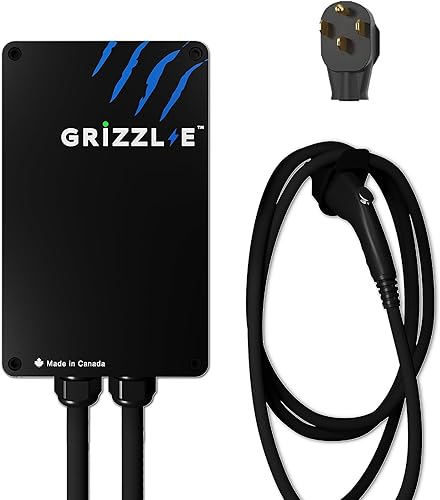
Grizzl-E Classic 40A NEMA 14-50 Charger
9.1/10 our score
See it on Amazon -
2
 Best for connected plug-in homes
ChargePoint HomeFlex NEMA 14-50 Charger
8.8/10 our score
See it on Amazon -
3
 Best for permanent connected setups
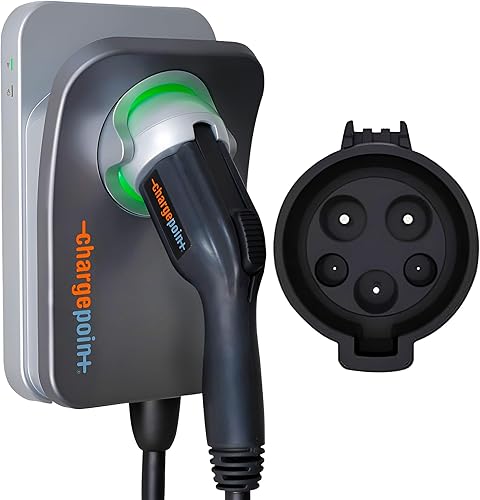
ChargePoint HomeFlex 50A Hardwired Charger
8.7/10 our score
See it on Amazon
- 4
 Check it
EVIQO 48A Hardwired J1772 Charger
Best for flexible charging routines - 5
 Check it
Emporia Pro 48A Hardwired Charger
Best for busy electrical panels - 6
 Check it
Emporia 48A Hardwired J1772 Charger
Best for scheduled overnight charging - 7
 Check it
Grizzl-E Classic Connect 40A Charger
Best for garages with spotty WiFi - 8
 Check it
Grizzl-E Ultimate 48A Hardwired Charger
Best for planning multiple chargers
How we chose the best Level 2 EV chargers for home
We compared connection type, usable output, cable reach and controls to identify which charger fits each home routine. Certifications, enclosure details and installation needs also shaped the choices.
The first pick favors simple daily use, while the others solve more specific needs. A lower-ranked model can be the better buy if you need household load management, app scheduling or power sharing across multiple chargers.
| Product | Best for | Maximum output | Connection | Cable | Our score |
|---|---|---|---|---|---|
| Grizzl-E Classic 40A NEMA 14-50 Charger | simple home charging | 40A | NEMA 14-50 plug | 24 ft | 9.1 |
| ChargePoint HomeFlex NEMA 14-50 Charger | connected plug-in homes | NEMA 14-50 plug | 23 ft | 8.8 | |
| ChargePoint HomeFlex 50A Hardwired Charger | permanent connected setups | 50A | Hardwired | 8.7 | |
| EVIQO 48A Hardwired J1772 Charger | flexible charging routines | Hardwired | 25 ft | 8.4 | |
| Emporia Pro 48A Hardwired Charger | busy electrical panels | 48A | Hardwired | 25 ft | 8.1 |
| Emporia 48A Hardwired J1772 Charger | scheduled overnight charging | 48A | Hardwired | 25 ft | 8.0 |
| Grizzl-E Classic Connect 40A Charger | garages with spotty WiFi | 40A | NEMA 14-50 plug | 25 ft | 7.9 |
| Grizzl-E Ultimate 48A Hardwired Charger | planning multiple chargers | 48A | Hardwired | 25 ft | 7.8 |
Best Level 2 EV chargers for home use
Choose Grizzl-E Classic for a simple plug-in setup, then look at the alternatives if you need connected controls or a permanent installation. Each option below includes a reason to buy it and a reason to move on.
Grizzl-E Classic 40A NEMA 14-50 Charger: Best for simple home charging
- 40A maximum output
- Four amperage settings from 16A to 40A
- 24 ft cable
- UL certified
Choose this adjustable plug-in charger when your priority is a simple charging routine. Its metal enclosure supports indoor or outdoor placement.
Pros
- Four selectable amperage settings
- Grizzl-E certifies it to UL standards
- Indoor and outdoor use
Cons
- Output limited to 40A
- Requires a suitable NEMA 14-50 outlet
Choose the Grizzl-E Classic when plugging in at home should be a simple part of parking. Its output adjusts among 16A, 24A, 32A and 40A, letting an electrician match it to the approved circuit capacity.
The metal enclosure supports indoor or outdoor use, and the 24 ft cable gives you room to place the unit near your parking space. Grizzl-E certifies the charger to UL standards and includes built-in GFCI protection.
This is a sensible first choice if your car can handle charging schedules and you don't need a phone dashboard from the charger itself. It also avoids choosing a higher-output hardwired unit when overnight charging already covers your driving.
Skip it if charger-based energy tracking or remote controls are central to your routine. Before buying, have an electrician assess the receptacle and wiring for continuous EV charging, as explained in our NEMA 14-50 EV charger guide.
ChargePoint HomeFlex NEMA 14-50 Charger: Best for connected plug-in homes
- Up to 40A through plug-in connection
- ChargePoint app controls
- J1772 connector
- Cold-resistant cable
A plug-in choice for drivers who want reminders, charging information and phone controls. Choose it when your outlet is suitable and connected features will be part of your routine.
Pros
- App controls and charging information
- Cold-resistant cable
- ChargePoint provides 24/7 support
Cons
- Plug-in output stops at 40A
- Tesla use needs a compatible adapter
Choose the plug-in ChargePoint HomeFlex if you want charging reminders, session information and phone controls while keeping a removable unit. The ChargePoint app also connects home charging with tools for finding charging stations away from home.
This version supplies up to 40A through its plug-in connection. The HomeFlex family's higher hardwired output should not be confused with what this NEMA 14-50 configuration can deliver.
Its 23 ft cold-resistant cable suits buyers who park within that reach, and ChargePoint provides 24/7 support. The J1772 connector connects directly to matching vehicle ports; Tesla use requires a compatible adapter.
Skip it if you won't use the app or need more output than the plug-in connection supports. ChargePoint calls for a suitable 40A or 50A circuit, with an electrician setting the charging current to match.
ChargePoint HomeFlex 50A Hardwired Charger: Best for permanent connected setups
- Hardwired installation
- Up to 50A
- ChargePoint app controls
- J1772 connector
Choose this HomeFlex for a permanent installation with ChargePoint app controls. Its higher output matters only when your car and electrical setup can use it.
Pros
- App reminders and charging information
- Indoor or outdoor installation
- Cold-resistant cable
Cons
- Requires professional installation
- Some functions require WiFi
Choose the hardwired ChargePoint HomeFlex if you want a permanent installation with the same app-based approach to charging. Its up to 50A output makes sense for a compatible car and a home that can support that setting.
The higher ceiling is most useful when you drive farther each day or have a shorter charging window. If a lower setting already replaces your daily energy overnight, maximum output offers less practical benefit.
ChargePoint includes a cold-resistant cable and supports indoor or outdoor installation. Some app functions and troubleshooting steps need WiFi, so check network coverage at the planned mounting spot.
Skip this version if you need a removable charger or your car cannot benefit from its extra capacity. Have the electrician confirm the exact installation requirements with ChargePoint, and include the full electrical work in your EV charger installation cost plan.
EVIQO 48A Hardwired J1772 Charger: Best for flexible charging routines
- 6A to 48A app adjustment
- 25 ft cable
- 2.4 GHz WiFi app controls
- Glow-in-the-dark connector holster
EVIQO suits drivers who want to adjust charging current, schedule sessions and track energy from their phone. The illuminated holster helps you find the connector's storage spot at night.
Pros
- Wide app-controlled current range
- Side reset button
- EVIQO provides a 3-year warranty
Cons
- Hardwired installation only
- App features require 2.4 GHz WiFi
Choose EVIQO if you want to change charging current from your phone and track sessions closely. Its app provides 6A to 48A adjustment, scheduling, reminders, energy tracking and remote start or stop over a 2.4 GHz WiFi network.
The 25 ft cable helps when the mounting location is farther from the vehicle's port. A glow-in-the-dark holster gives the connector a visible storage point at night, while a side reset button allows a restart without opening the enclosure.
EVIQO specifies a dedicated 60A, 240V circuit for its normal maximum output. It also provides a separate 50A configuration using internal switches on a dedicated 70A circuit, which belongs in the electrician's installation plan.
Skip it if you want a plug-in unit or have no use for connected controls. Lowering current in the app does not provide the automatic whole-home demand management offered by the Emporia Pro package.
Emporia Pro 48A Hardwired Charger: Best for busy electrical panels
- 48A hardwired charging
- Emporia Vue energy monitor included
- PowerSmart load balancing
- 25 ft cable
Consider the Pro when charging must fit around household electrical demand. The included Vue monitor and PowerSmart software add home energy tracking and automatic load management.
Pros
- Vue monitor and PowerSmart included
- App scheduling and usage tracking
- Emporia provides a 3-year warranty
Cons
- Monitor adds installation work
- Panel suitability needs professional assessment
Choose Emporia Pro when household electrical demand is the main concern. Its included Vue monitor and PowerSmart software give it a different role from a charger that simply follows a fixed schedule.
Emporia says PowerSmart adjusts charging load around the home's electricity use. That can make this package worth considering before assuming that adding an EV requires a service upgrade.
The hardwired charger supplies up to 48A through a 25 ft J1772 cable. Its app adds charging schedules and usage tracking, while the Vue monitor shows home energy use beyond the charging session.
Skip the Pro if you only want overnight scheduling and don't need household monitoring. Have an electrician assess the monitor installation and load-management setup before relying on it to avoid an upgrade, since it cannot create extra electrical capacity or remove the need for suitable charger wiring.
Emporia 48A Hardwired J1772 Charger: Best for scheduled overnight charging
- 48A hardwired connection
- J1772 connector
- 25 ft cable
- WiFi app controls
A direct choice for drivers who want app schedules and charging data without the Pro's included home energy monitor. It comes preconfigured for a permanent hardwired installation.
Pros
- Emporia certifies it to UL and Energy Star standards
- App data and scheduling
- Emporia provides a 3-year warranty
Cons
- Hardwired installation only
- WiFi features need a 2.4 GHz network
Choose the standard Emporia hardwired charger if your main goals are scheduled sessions and charging energy data. It covers those needs without the Pro package's included home monitor, making the choice simpler for a home with adequate capacity.
The charger comes preconfigured for hardwiring with a whip and uses a J1772 connector. Emporia certifies it to UL and Energy Star standards and backs it with a 3-year warranty.
App features require a 2.4 GHz WiFi connection. Check coverage where the unit will sit, especially if the garage is detached or the router is on the far side of the house.
Skip this version if automatic household load management is the feature you need. Also choose a plug-in alternative if moving the charger between suitable locations matters more than a permanent installation.
Grizzl-E Classic Connect 40A Charger: Best for garages with spotty WiFi
- NEMA 14-50 plug
- Up to 40A
- WiFi monitoring and schedules
- Charging works without internet
Classic Connect suits plug-in buyers who want charging statistics and schedules with basic charging available offline. Advanced OCPP capability carries a one-time activation fee.
Pros
- Selectable amperage
- Online monitoring with offline charging
- Indoor and outdoor metal enclosure
Cons
- Requires a suitable NEMA 14-50 outlet
- Advanced OCPP features have an activation fee
Choose Classic Connect if you want a plug-in Grizzl-E with charging statistics and schedules, plus basic charging without an online connection. That offline capability matters when WiFi coverage in the garage is unreliable.
The unit combines selectable output with a metal enclosure and a 25 ft cable. Grizzl-E includes built-in GFCI protection and a 3-year warranty.
Its connected tools add a reason to choose it over the simpler Classic when you want to review energy use or manage a charging schedule through the charger. Check network coverage anyway, since offline charging does not give you live remote monitoring.
Skip it if you want the simplest charging routine and won't use those tools. Advanced OCPP capability has a one-time activation fee, so confirm that a specific integration needs it before paying for an extra feature.
Grizzl-E Ultimate 48A Hardwired Charger: Best for planning multiple chargers
- 48A hardwired charging
- 25 ft J1772 cable
- WiFi app controls
- Multi-charger power distribution
Consider this hardwired model when planning a setup with multiple chargers. Grizzl-E offers automatic power distribution with equal sharing or priority charging.
Pros
- Multi-charger power management
- Indoor or outdoor aluminum enclosure
- Charging works without an online connection
Cons
- Hardwired installation only
- Advanced OCPP features have an activation fee
Choose this Grizzl-E hardwired model if you're planning a setup with multiple chargers. Grizzl-E offers automatic power distribution with equal sharing or priority charging, giving it a role beyond charging one vehicle.
Ask the installer to confirm the equipment and configuration needed for that arrangement. Sharing power among chargers is a different task from monitoring demand across the whole house.
For daily use, the unit provides app schedules, charging statistics and remote control through WiFi. Charging also works without an online connection, and an external antenna supports its wireless connection.
Grizzl-E uses a cast aluminum enclosure for indoor or outdoor placement and includes a hardwire kit. Skip it if you need a removable unit or only want basic single-car charging, and check whether any planned advanced OCPP integration requires the separate activation fee.
How do you choose a home Level 2 EV charger?
Choose by vehicle compatibility, charging need and electrical fit, in that order. Cable placement and useful controls should decide between the models that pass those first checks.
Does the home Level 2 EV charger connector match your car?
Match the charger's vehicle connector to your car's actual charge port. Don't choose by badge or model year alone, since a brand can sell vehicles with different ports.
For a quick overview, see J1772 vs NACS. If an adapter is needed, confirm its direction, vehicle support and permitted charging current in the vehicle and adapter instructions.
A household plug and a vehicle connector do different jobs. “NEMA 14-50” describes the connection to the wall, while “J1772” describes the connection to the car.
How much home charging do you need overnight?
Size charging around the energy you normally replace each day, rather than a nearly empty battery. A driver with a long overnight parking window may need less output than someone who returns late and leaves early.
For a rough estimate, divide your expected energy need in kWh by your available charging hours. Replacing 24 kWh over 8 hours calls for about 3 kW before charging losses and other limits, which shows why maximum output isn't always necessary.
Use your car's recent energy-use information to make that estimate more useful. Leave room for colder weather, longer trips and nights when you have less time plugged in.
Does your home support the charger's amperage?
The selected charging current must fit the electrical installation, and the car must be able to accept it. A charger with a high maximum won't force more power into a vehicle with a lower AC charging limit.
Have an electrician assess panel capacity and size the wiring and circuit for continuous charging. Our EV charger breaker size guide explains why a breaker number and a charging-current number are different.
Ask for the approved output setting to be recorded at installation. That gives you a clear reference if an app reset or later equipment change prompts you to review settings.
Is a plug-in or hardwired charger a better fit?
Choose plug-in charging when a suitable outlet is already available and removability matters. Choose hardwiring when you want a permanent installation or the output your chosen model reserves for that connection.
An existing receptacle still needs assessment, especially if its wiring history is unknown. A matching plug shape alone does not confirm that the circuit is ready for hours of EV charging.
Compare the full work required in our hardwired vs plug-in guide. If both options need new wiring, get quotes for both before treating plug-in charging as the simpler job.
How much cable length do you need?
Measure the actual route from the proposed mounting point to the car's port. Allow for the car parking slightly farther forward or backward, and for enough slack to avoid pulling on the connector.
Use a string or tape along the planned route rather than measuring straight through the car. Check the layout with a second vehicle parked nearby and the garage door in use.
Choose a mounting point that keeps the cable clear of tires, walkways and door edges. A little extra cable helps with reach, but a poor mounting location can leave even a long cable stretched.
Which smart features will improve your charging routine?
Prioritize schedules, useful energy records and any needed load management. Remote controls are helpful when they solve a routine task, but they don't replace a suitable electrical installation.
Put charging schedules in one place
Use either the car or the charger as your main scheduling tool at first. Two overlapping schedules can leave a short charging window or make a missed session harder to explain.
If your utility offers lower overnight rates, enter the correct hours and check that charging finishes before departure. Cheap hours only help if the car receives enough energy for the next day.
Separate charging records from household monitoring
Session data helps you see how much energy the charger supplied. An app's money estimate also depends on the electricity rate you entered, so it may not match every item on your utility bill.
Whole-home monitoring answers a broader question about when other appliances use energy. Emporia Pro includes equipment for that purpose, while ordinary charger statistics focus on charging activity.
Check WiFi where the charger will sit
Check your phone's connection at the mounting spot with the garage door closed. For models that require 2.4 GHz WiFi, confirm that your home network supports that band.
If remote control is essential, fix weak coverage before installation. For the Grizzl-E connected models here, offline charging provides a useful fallback, but online statistics and remote access still depend on connectivity.
What should you settle before installation day?
Agree on charger placement, circuit capacity and the approved current setting before the electrician begins. That avoids choosing a convenient wall position that leaves the cable awkward to use.
Share the exact charger model, vehicle port location and normal parking layout with the installer. Ask whether the quote includes permits where required, mounting, wiring, any receptacle work and final configuration.
Renters and condo residents should get the needed property approval before arranging work. Also consider whether a future car would park in the same position or have its charge port on a different side.
At handover, confirm the cable reaches without tension and that the connector has a safe storage point. Ask the installer to explain normal status signals and what to do if charging stops.
For app-equipped models, complete account setup and confirm a session appears in the app. Keep the installation record, approved output setting and warranty information together for later reference.
How should you use and care for a home EV charger?
Keep the connector stored, the cable clear of damage and the charging routine easy to follow. A short visual check while plugging in can catch wear before it becomes a larger problem.
Return the handle to its holster after charging and store the cable in loose loops. Avoid sharp bends, crushing the cable under a tire or leaving the connector where it can collect standing water.
Follow the manufacturer's cleaning instructions and avoid spraying water into connectors or enclosure openings. Outdoor-rated equipment still needs careful placement and proper connector storage.
Stop using equipment that has damaged insulation, scorch marks, a loose connection or an unusual burning smell. Repeated faults or breaker trips need attention from the installer or manufacturer rather than repeated resets.
Review schedules after a utility-rate change or a change in your commute. Follow your vehicle maker's everyday charge-limit guidance instead of treating a full battery as the goal for every session.
Which home charging mistakes should you avoid?
Avoid buying for maximum amperage before checking the car and home. Installation fit and daily energy needs should lead the decision.
- Assuming a matching outlet is ready. Have its wiring, condition and suitability checked before using it for sustained charging.
- Raising current to solve slow charging. First check the car's AC limit, its settings and the installer's approved charger setting.
- Confusing manual adjustment with load management. Lowering an app setting doesn't automatically respond when household demand rises.
- Treating multi-charger sharing as whole-home monitoring. Confirm which loads the chosen system manages.
- Buying extra reach through an extension cord. Choose suitable cable reach and placement from the start.
- Changing several schedules at once. Make one change, then confirm the next session behaves as expected.
If the planned charger cable won't reach, revisit mounting location or parking position. Our EV charger extension cord guide explains the issues to resolve before adding anything between the charger and its power source.
Which Level 2 EV charger should you choose?
The best Level 2 EV charger for home is the one that covers your daily driving within an installation your home can support. Use these decision rules to narrow the final choice.
Choose Grizzl-E Classic for simple plug-in charging. Choose the plug-in ChargePoint HomeFlex when reminders and charging information will be part of your routine, or its hardwired version when you want a permanent connection and can use the higher output.
Choose EVIQO for flexible app-controlled current settings. Choose Emporia Pro when household load management needs professional planning, or the standard Emporia when schedules and session data are enough.
Choose Classic Connect for connected plug-in charging with an offline fallback. Consider the hardwired Grizzl-E option when planning multiple chargers and have the installer confirm the power-sharing arrangement.
Before ordering, settle the connector, cable route and installation quote. If your daily driving leaves you unsure whether this upgrade is needed, read Do you need a Level 2 charger at home?.
Our top 3 picks at a glance
-
1
Best for simple home charging
Grizzl-E Classic 40A NEMA 14-50 Charger
9.1/10 our score
See it on Amazon -
2
Best for connected plug-in homes
ChargePoint HomeFlex NEMA 14-50 Charger
8.8/10 our score
See it on Amazon -
3
Best for permanent connected setups
ChargePoint HomeFlex 50A Hardwired Charger
8.7/10 our score
See it on Amazon
Frequently asked questions
What is the best Level 2 EV charger for home use?
The Grizzl-E Classic is our first choice for simple plug-in home charging, while ChargePoint HomeFlex suits drivers who want app controls; your final choice should follow your car's charging limit, connector and installation plan. Have an electrician confirm the outlet, circuit and panel before ordering.
Should I choose a plug-in or hardwired home EV charger?
Choose plug-in charging when you have an electrician-approved outlet and want a removable unit; choose hardwiring for a permanent installation or output beyond a plug-in model's limit. Compare the electrical work and everyday trade-offs in our hardwired vs plug-in EV charger guide before committing to either setup.
Will a J1772 charger work with a Tesla?
A J1772 charger can charge a Tesla through a compatible AC charging adapter; check your vehicle manual for the correct adapter and its limits before buying. Our NACS to J1772 adapter guide explains why connection direction matters: an adapter for the opposite arrangement won't solve the same problem.
How many amps should a home EV charger have?
Choose enough amperage to replace your normal driving energy during your available charging window; more current only helps when both your car and home circuit support it. Our guide to how many amps a Level 2 EV charger needs explains the trade-off between output, overnight charging time and electrical capacity.