J1772 vs NACS: What Is the Difference? (October 2026)
The main difference in J1772 vs NACS is the plug and matching vehicle port. Choose the connector your EV accepts directly, and check adapter compatibility separately for Level 2 AC charging and DC fast charging.
On this page (8 sections)
- J1772 vs NACS: what is the main difference?
- Which charger or adapter suits your situation?
- Do adapters make J1772 and NACS interchangeable?
- Does J1772 or NACS charge faster at home?
- How should you plan a J1772 or NACS installation?
- How do you care for connectors and adapters?
- Which buying mistakes should you avoid?
- J1772 vs NACS: which should you pick?
For J1772 vs NACS, choose the home charger plug that matches your EV’s charge port. The connectors have different shapes, and an adapter only helps when it supports your vehicle, charger and charging type.
J1772 is common on many older non-Tesla EVs, while NACS is used by Teslas and many newer EVs. Check your exact vehicle rather than choosing by brand or model year alone.
For home use, focus on a direct connection, enough overnight charging and a cable that reaches your parking spot.

J1772 vs NACS: what is the main difference?
J1772 and NACS differ in shape and charging support. J1772 is an AC charging connector; NACS can support AC charging or DC fast charging through compatible equipment.
At home, both connector types can serve the same purpose: carrying AC power to your EV’s onboard charger. That onboard charger converts the power for the battery.
Public charging needs a closer check. A NACS connector on a destination charger does not mean it provides the same charging service as a NACS connector at a DC fast charger.
Many vehicles with J1772 AC connections use a CCS1 inlet for DC charging. CCS1 adds 2 large DC contacts below the J1772 portion, so an adapter that connects to the AC portion does not gain DC capability.
How can you identify a J1772 vs NACS port?
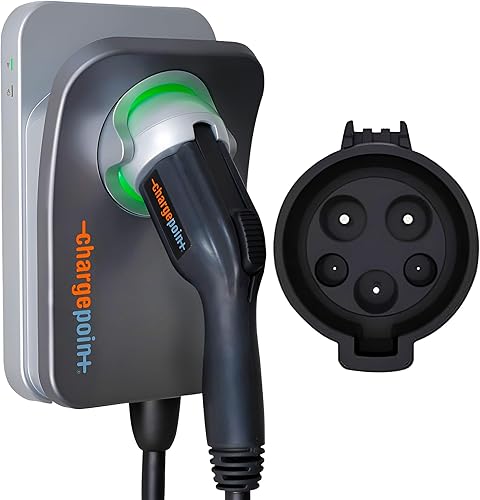
Use the connector name in your vehicle manual, then compare it with the inlet on your car. J1772 has a larger, round connector face with 5 contacts; NACS has a slimmer connector face with 5 contacts.
A CCS1 inlet includes a J1772-shaped upper section and separate lower DC contacts. You use the upper section for a J1772 home charger.
If you’re ordering a vehicle, confirm its actual charging inlet before ordering home equipment. A planned change across a brand does not establish the port fitted to every car.
Which charger or adapter suits your situation?
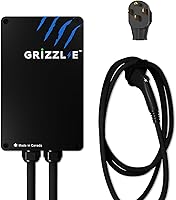
Choose ChargePoint for a J1772 home setup, Lectron for access to compatible NACS AC equipment, and EVIQO for a NACS home setup. These products solve different problems, so the adapter is not a substitute for either wall charger.
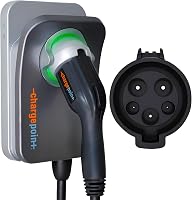
ChargePoint HomeFlex: for a permanent J1772 setup
The ChargePoint HomeFlex suits a household whose main EV has a J1772 port. Its hardwired connection makes sense when you have a fixed parking spot and want a permanent charging station.
Output adjusts from 16–50A, allowing the installer to match the charger to the available circuit. The car can draw less than the selected limit, so you don’t need maximum output to use this charger.
The ChargePoint app provides charging controls, reminders and charging information. Certain functions and troubleshooting steps need WiFi, so check coverage at the mounting location.
ChargePoint specifies UL certification, indoor or outdoor installation and a cold-resistant cable. Those features suit a garage or exposed parking area, provided an electrician installs the unit correctly.
Skip this version if you need a charger that plugs into an existing outlet. For a NACS-only household, a direct NACS charger also avoids an adapter at every charging session.
Lectron adapter: for using NACS AC chargers with a J1772 EV
The Lectron adapter suits a J1772 driver who already has access to compatible Tesla AC charging equipment. That could be a Wall Connector at home or a Destination Charger at a place you visit.
Its 80A, 240V AC limit describes supported capacity, not the current your car will receive. Lectron specifies UL 2252 certification, built-in temperature monitoring and IP67 protection against dust and water.
Keep this adapter in mind when a working NACS charger already serves your parking space. After compatibility checks, adapting the connection may be more practical than replacing the charging station.
Skip it if your goal is Tesla Supercharger access. Also skip it if your car has a NACS port and the available charger has a J1772 plug, because that requires the opposite adapter direction.
Our NACS-to-J1772 adapter guide covers the connection and its limits in more detail.
EVIQO charger: for a direct NACS connection at home
The EVIQO suits a NACS household that wants a hardwired charger with app scheduling. Its 25 ft cable gives you room to plan around a charge port near the front or rear of the vehicle.
Standard output reaches 48A on a dedicated 60A, 240V circuit. EVIQO also specifies a 50A setting on a dedicated 70A circuit, which the installer should configure if appropriate.
The app controls charging, speed and schedules, and it requires a 2.4 GHz WiFi network. Check that network at the actual wall location before installation.
EVIQO specifies an IP66/NEMA 4 enclosure and includes a glow-in-the-dark connector holster. The holster is useful when your charging area is dim and you need a clear place to return the plug.
Skip it if you need a plug-in unit or mainly charge a J1772 car. A J1772 vehicle needs a compatible adapter that is not included.
Do adapters make J1772 and NACS interchangeable?
Adapters bridge specific connections, not every charging system. Match the direction, charging type and approved equipment before considering current capacity.
Write the connection in this order: charger plug, adapter, vehicle port. A NACS-to-J1772 adapter takes a NACS charger plug and connects it to a J1772 vehicle.
A J1772-to-NACS adapter does the reverse. Similar names can hide this difference, so read the connection description rather than buying from a photo alone.
AC and DC adapters also serve different purposes. An AC adapter cannot turn a destination charger into a fast charger or make a J1772 AC inlet accept DC power.
What should you check at a destination charger?
Confirm both compatibility and permission to charge. A hotel, workplace or private site may limit access, require activation or reserve the equipment for certain users.
Check the station’s access instructions before parking and connecting. An adapter changes the physical connection, but it does not grant access to restricted equipment.
Inspect the cable and connector before use, then follow the adapter’s connection sequence. If charging does not start, check station access and vehicle messages before repeatedly unplugging and reconnecting.
Can a Tesla use a J1772 home charger?
Yes, with a suitable J1772-to-NACS adapter approved for the vehicle and charger. Check whether the correct adapter is already among your vehicle accessories before buying another.
That can make a J1772 charger practical in a shared household. For more home charging choices, compare our Tesla Wall Connector alternatives.
Does J1772 or NACS charge faster at home?
Neither connector automatically charges faster at home. The usable charging rate depends on the circuit, charger settings and vehicle’s onboard AC charging limit.
Think of those limits as a chain. Increasing one limit does not help if another part already caps the charging rate.
For example, a vehicle that accepts less AC current than the charger supplies will stop at its own limit. An adapter with a higher capacity cannot raise that limit.
Battery size, state of charge and temperature also affect how long a charging session takes. Avoid choosing equipment from a universal “full charge overnight” promise without checking your vehicle and daily driving needs.
How much output do you actually need?
Size home charging around the energy you replace between trips. A long overnight parking window may let a lower-output installation cover your normal driving.
Give the electrician your usual driving distance, parking hours and vehicle charging specifications. This helps separate useful capacity from electrical work that adds little benefit to your routine.
Our home EV charger guide explains the wider equipment choices. If you’re still deciding whether to add a 240V circuit, start with Level 1 vs Level 2 EV chargers.
How should you plan a J1772 or NACS installation?
Confirm electrical capacity and cable reach before choosing the mounting spot. Both wall chargers here require professional hardwired installation.
Have a licensed electrician assess panel capacity, the cable route and the required circuit. Charger output must suit the complete installation, including the breaker and wiring.
A breaker’s number is not the charging current you should select. For the relationship between continuous charging loads and circuit sizing, read our EV charger breaker size guide.
Measure from the wall to the vehicle’s port
Measure the cable path in your normal parking position, including bends around the car. A straight line across an empty garage can underestimate the reach you need.
Leave enough slack to connect without pulling sideways on the vehicle inlet. Check a second parking position too if you sometimes reverse into the space or share the driveway.
Choose a route that avoids walkways, garage door tracks and places where a tire could cross the cable. Don’t plan to solve poor placement with an extension cord.
Our EV charger extension cord guide explains why cable reach should be settled during planning.
Set up controls before relying on overnight charging
Complete commissioning and confirm a charging session before depending on a schedule. Let the installer establish the electrical settings, then follow the charger’s app setup instructions.
If both your car and charger have schedules, start with one schedule active. Overlapping windows can prevent charging when you expect it to begin.
Check the time zone and any utility off-peak window before saving the schedule. Confirm the car reports charging, since a connected plug alone does not mean power is flowing.
For a broader setup plan, see Level 2 home chargers. Our hardwired vs plug-in charger comparison helps if you haven’t settled on permanent wiring.
How do you care for connectors and adapters?
Keep connection points clean, dry and free from strain. Inspect the plug, cable and any adapter regularly, especially if you carry equipment between locations.
Look for cracked housings, damaged latches, bent contacts or discoloration. Stop using damaged equipment and seek guidance from the manufacturer rather than trying to repair electrical contacts yourself.
Return the connector to its holster after charging. Coil the cable in broad loops instead of tight bends, and keep it away from tires and sharp edges.
Weather protection does not make dirt or moisture inside a connection harmless. Follow each manual’s cleaning and storage instructions, and never insert tools into the contacts.
With an adapter, make sure both connections are fully seated using the required sequence. End the session as directed before disconnecting, and avoid pulling on the cable to release a plug.
If you notice a burning smell, visible damage or unusual heat, stop the session. Temperature monitoring is a protective feature, not a reason to keep using a suspect connection.
Which buying mistakes should you avoid?
The biggest mistakes are choosing the wrong adapter direction and paying for output your setup cannot use. Check the complete charging path before ordering any equipment.
- Choosing by vehicle badge alone: confirm the inlet on your exact car, including a vehicle you haven’t received yet.
- Confusing NACS with fast charging: identify whether the station provides AC or DC power.
- Treating an adapter as a charger: you still need compatible charging equipment and a suitable power source.
- Choosing maximum amperage first: check the car’s limit and the installation requirements together.
- Ignoring daily handling: allow room for the adapter, cable bends and easy access to the release latch.
- Replacing working equipment too soon: a compatible, approved adapter may let an existing home charger serve a different vehicle.
For a shared household, decide which vehicle charges most often and which needs the longer charging window. Give that vehicle the simplest connection, then confirm the other car’s adapter option.
Don’t buy around a possible future EV unless you know its port and charging needs. A charger that fits your current car well has an immediate use.
J1772 vs NACS: which should you pick?
Pick ChargePoint for a permanent J1772 setup and EVIQO for direct NACS home charging. Choose the Lectron adapter when your J1772 EV needs access to compatible NACS Level 2 AC equipment.
Keep a working charger if an approved adapter meets your needs. For a new installation, prioritize the car you charge most, adequate overnight output and a cable path you can use every day.
The final J1772 vs NACS decision starts with your vehicle’s port and ends with the complete installation. Use our home EV charger guide to compare the remaining choices before ordering.
Frequently asked questions
Is J1772 the same as NACS?
No, J1772 and NACS have different plug shapes and need matching vehicle ports or suitable adapters; J1772 handles AC charging, while NACS can carry AC or DC with compatible equipment. A NACS plug alone does not tell you which charging type a station provides.
Do I need an adapter to charge a J1772 EV with a NACS charger?
Yes, you need a compatible NACS-to-J1772 adapter for a J1772 EV to use a NACS Level 2 AC charger; check approval for your vehicle and the specific charger before connecting them. The Lectron adapter covered here cannot be used at Tesla Superchargers or for DC fast charging.
Can a Tesla use a J1772 home charger?
A Tesla can use a compatible J1772 home charger with a suitable J1772-to-NACS adapter; check your vehicle manual for the required adapter and operating steps. The Lectron adapter in this comparison works in the opposite direction, so it is not the adapter for this setup.
Which connector should I choose for a home charger?
Choose the connector that directly fits the vehicle you charge most often; for a shared charger, check approved adapter options for the second vehicle before buying. Circuit capacity, cable reach and the car’s AC charging limit matter more to daily use than choosing a connector based on future trends.