ChargePoint Home Flex vs Emporia: Which Is Better? (October 2026)
In Emporia vs ChargePoint, choose Emporia Pro for included home energy monitoring and automatic load balancing, or ChargePoint for adjustable output and an app that also helps you find public stations. Match the charger to your electrical capacity, vehicle and overnight charging needs before choosing by maximum amperage.
On this page (10 sections)
- Emporia vs ChargePoint: which buyer suits each charger?
- Does the charging-speed difference matter?
- How does Emporia's load management change the decision?
- Which app fits your charging routine?
- Will the cable reach, and does the connector fit?
- What should an electrician confirm before installation?
- Can either charger work outdoors?
- How should you set up and care for either charger?
- Which buying mistakes should you avoid?
- Emporia vs ChargePoint: which should you buy?
In Emporia vs ChargePoint, choose Emporia Pro for household energy monitoring and load balancing, or ChargePoint Home Flex for adjustable output and an app that covers home charging and public station search.
The useful difference is how each charger fits your home and routine. Emporia helps you manage charging alongside household electrical demand; ChargePoint suits drivers who want charging reminders, charging information and smart home connections.
Both compared models are hardwired Level 2 chargers. Start with the electrical work your home needs, using our home EV charger installation cost guide to plan the questions for an electrician.
 Best for public charging users
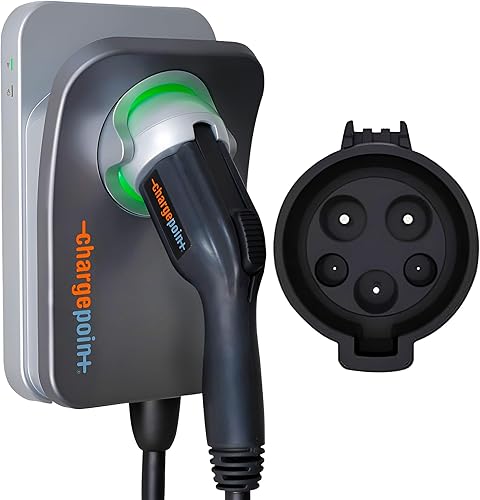
ChargePoint HomeFlex 50A Hardwired Charger

Emporia vs ChargePoint: which buyer suits each charger?
Emporia suits homes where managing available electrical capacity is a priority; ChargePoint suits drivers who want home and public charging tools in one app. Neither should be chosen solely because its maximum output is higher.
Who should choose Emporia over ChargePoint?
Choose Emporia if you want to see household electricity use and have charging respond to other electrical demand. Its included Vue Home Energy Monitor and PowerSmart software give it a clear purpose beyond charging the car.
This is especially relevant when an electrician identifies limited spare service capacity. Ask whether managed charging can meet your needs while other large appliances run, rather than assuming the only choices are full-speed charging or a service upgrade.
Skip Emporia if you have no use for household monitoring and don't want the extra equipment involved. A straightforward charging installation may suit your needs without adding an energy-monitoring system.
Who should choose ChargePoint over Emporia?
Choose ChargePoint if you expect to use public station search as well as home charging controls. Its app brings those tasks together, which can be useful for drivers who charge both at home and away.
The adjustable output also suits an installation where the electrician selects a charging level below the unit's maximum. The correct setting follows the electrical plan, not a preference for the highest number.
Skip ChargePoint if automatic household load balancing is your main buying requirement. The home energy-management package described here belongs to Emporia, so don't assume app connectivity provides the same function.
Does the charging-speed difference matter?
The 2A maximum-output gap should rarely decide this purchase. ChargePoint adjusts from 16A to 50A, while the hardwired Emporia Pro supports up to 48A.
Your car's onboard AC charger sets one limit, and the electrical installation sets another. A higher-output wall unit cannot push the vehicle beyond the rate it accepts.
Daily driving matters more than charging an empty battery as quickly as possible. If either charger replaces the energy you use before your next departure, the small maximum-output difference adds little practical value.
For a long commute and a short overnight window, ask the electrician what sustained charging output your home can support. Then compare that with the vehicle's AC charging limit and the energy you typically need to replace.
Don't judge performance from miles-per-hour claims alone. Vehicle efficiency, charging losses and battery conditions affect how much driving range you gain.
Our guide to how many amps a Level 2 charger needs explains how to match output to driving needs. Check that before paying for electrical work aimed at maximum amperage.
How does Emporia's load management change the decision?
Emporia's main advantage is managing charging alongside household electrical demand. Emporia says PowerSmart automatically balances the load and can help avoid a panel upgrade.
That benefit requires a suitable installation. It doesn't mean every full panel, older service or existing circuit can support the charger without other electrical work.
Load management also involves a tradeoff: the car may receive less power while the home needs more elsewhere. That's useful when you have a long charging window, but worth discussing if you need a large recharge between evening arrival and an early departure.
Ask the installer to explain the proposed operating limits and how the monitor supports them. You should understand why charging may slow when other electrical demand rises.
The included Vue monitor also provides real-time household energy information. Choose that feature because you'll use the information to adjust habits or understand demand, rather than treating more app data as a benefit by itself.
If your service already has enough capacity, load balancing may carry less weight. Cable reach, connector fit and the controls you prefer can then become the deciding factors.
Which app fits your charging routine?
Choose ChargePoint for public station search and home charging reminders, or Emporia for charging schedules and household energy tracking. Focus on the actions you'll repeat each week.
ChargePoint's app provides charging information, reminders and smart home connections. Its station search can help with charging away from home, although a public network's size doesn't change the power available in your garage.
Emporia's app supports automated charging schedules and real-time usage tracking. If your utility charges different rates by time of day, scheduling can shift charging into a cheaper period.
Check your actual utility plan before setting an overnight schedule. Nighttime electricity isn't automatically cheaper, and a short low-rate window may not provide enough time for your usual recharge.
If you also use a charging schedule in the vehicle, make sure the two schedules agree. A car waiting for one start time and a charger waiting for another can leave a much shorter charging window than you intended.
ChargePoint needs Wi-Fi for certain functions and troubleshooting steps. Emporia offers Wi-Fi and Bluetooth setup support, but that alone doesn't establish what every feature can do without an internet connection.
Before installation, check wireless coverage at the mounting point. Ask the manufacturer about any offline behavior you depend on, such as starting a charge or following a saved schedule.
Will the cable reach, and does the connector fit?
Choose a mounting location from the real cable route and your vehicle's inlet position. Emporia has a 25-ft cable, compared with ChargePoint's 23-ft cable.
Measure with the car parked as you normally leave it. Include the path around a bumper or along the side of the vehicle, leaving enough slack to connect without pulling on the inlet.
A cable that reaches only when the car is parked perfectly creates a daily nuisance. Consider another household vehicle, reversed parking and whether an open garage door changes the usable route.
Both units here use J1772 connectors. Check the actual inlet on your car rather than relying on a broad label such as “non-Tesla,” since connector types vary across vehicles and model years.
For a NACS-equipped car, confirm the appropriate adapter and its approved use before choosing either model. Our NACS to J1772 adapter guide explains the connection checks.
Don't plan to solve poor placement with a general-purpose extension cord. Read our EV charger extension cord guide before designing a setup around extra reach.
What should an electrician confirm before installation?
Get an electrical assessment before ordering, especially if load management is the reason you're considering Emporia. Both compared units need a hardwired installation.
Give the electrician your vehicle's AC charging limit, typical daily mileage and usual charging window. This helps them recommend a useful charging level instead of designing around the highest advertised output.
Ask for a scope that covers the circuit route, mounting location, service capacity and any monitoring equipment. A nearby panel doesn't guarantee a simple job if the electrical capacity or cable route needs work.
Emporia's package includes the Vue monitor, 2 200A CT sensors, mounting hardware, a wall mount and a handle holster. Include the monitor installation in the quote so the charger and load-management plan are considered together.
ChargePoint directs buyers to licensed electricians, and Emporia recommends professional installation. Ask who will configure the charging limits and show you how the completed setup should operate.
Don't select a breaker by matching its number to the charger's output. EV charging is a continuous load, so the circuit must be sized for the permitted charging current and installation requirements.
Our EV charger breaker-size guide explains that relationship. The installer should follow the equipment instructions and applicable electrical rules.
Emporia says its charger includes GFCI protection and recommends hardwiring to reduce nuisance tripping associated with GFCI breakers. Let the electrician choose the required protection; don't remove protection to stop a trip.
If you already have a suitable outlet, compare the full installation options before committing. Our hardwired vs plug-in EV charger guide covers the tradeoffs, but these specific compared models are hardwired versions.
Can either charger work outdoors?
ChargePoint supports indoor or outdoor installation, while Emporia describes its charger as weather-resistant. Confirm the permitted exposure and mounting requirements for your exact installation.
ChargePoint includes a cold-resistant cable. That can matter for winter cable handling, but the mounting position still needs to keep the cable clear of vehicle tires and common walking routes.
For either charger, choose a place where the connector can be stored securely between uses. Avoid locations where snow removal, garden tools or a closing garage door could damage the cable.
Weather resistance doesn't mean every placement is suitable. Follow the manufacturer's instructions for mounting and exposure, and use our outdoor EV charger guide to plan the location.
How should you set up and care for either charger?
Start with the installer-approved settings, then build a simple charging routine around your departure time. Leave electrical limits at the configured values.
After installation, complete the app setup and confirm that the car starts charging as expected. Check the first scheduled charging session so a conflicting vehicle setting doesn't go unnoticed.
Use the charge target recommended in your vehicle manual. The wall charger supplies power, while the vehicle manages its battery charging limits.
Store the cable in loose loops using the approved storage method. Keep it off the driving path, and avoid tight bends, knots or pulling the connector free by its cable.
Check the cable and connector for damage, trapped debris or signs of overheating before use. Stop using equipment with damaged insulation, a loose connection or unusual heat, and seek professional help.
Follow the manufacturer's cleaning instructions and avoid directing water into the connector. A quick visual check while putting the cable away is easier than discovering damage when you next need to leave.
Which buying mistakes should you avoid?
The biggest mistake is choosing the charger before checking the installation and vehicle. These errors can matter more than the difference between the brands.
- Buying for maximum amperage alone. Match charging capacity to the energy you need during the time the car is parked.
- Assuming load management guarantees no upgrade. Have the electrician confirm that the proposed system suits your service and charging window.
- Measuring a straight line to the car. Follow the actual cable path and leave slack at the connector.
- Confusing connection methods. A charging connector goes into the vehicle; hardwiring or a NEMA plug describes how the charger connects to the home.
- Overlooking app setup. Confirm wireless coverage, account access and schedules before depending on an overnight charge.
Keep the installation details and configuration information where you can find them. If you change vehicles or add a major household electrical load, revisit the charging plan rather than raising the output yourself.
Emporia vs ChargePoint: which should you buy?
Buy Emporia when an electrician confirms that managed charging suits your home; buy ChargePoint when its adjustable output and home-and-away app tools fit your routine. Treat the electrical assessment as the first buying step.
Emporia makes the strongest case when the included monitoring equipment solves a clear household need. ChargePoint makes sense when you want charging reminders, charging information and station search without making whole-home monitoring part of the purchase.
For closer product detail, read our ChargePoint Home Flex review and Emporia Pro EV charger review. Compare those features against the installation quote, not just each other.
If you're unsure how much charging equipment your routine requires, start with whether you need a Level 2 charger at home. For the wider category, see home EV chargers: Level 1, Level 2 and what to buy.
Frequently asked questions
Is Emporia or ChargePoint better for home charging?
Emporia Pro is the better fit for household energy monitoring and automatic load balancing. ChargePoint suits drivers who want adjustable output, charging reminders and public station search in one app.
Choose around your electrical plan and daily driving needs, then check connector compatibility before ordering.
Does ChargePoint Home Flex charge faster than Emporia Pro?
ChargePoint can deliver up to 50A, compared with the hardwired Emporia Pro's 48A. That small gap matters only if both your vehicle and electrical installation can use the extra output.
For overnight charging, the available charging window usually matters more than this difference in maximum current.
Can Emporia Pro help avoid a panel upgrade?
Emporia says PowerSmart can help avoid a panel upgrade by automatically balancing charging against household electrical demand. It cannot make undersized wiring or an unsuitable circuit acceptable.
Have an electrician assess the service, planned circuit and monitoring setup before relying on load management as your installation solution.
Do these chargers work with Tesla vehicles?
These compared models have J1772 connectors, so a vehicle with a NACS inlet needs a suitable adapter. ChargePoint specifically calls for an adapter with Tesla vehicles.
Check your vehicle manual and approved compatibility guidance; our NACS to J1772 adapter guide explains how to match the connection.
Should I choose a plug-in or hardwired EV charger?
Choose hardwiring when it suits the planned permanent installation and required output. A plug-in charger may suit an existing suitable outlet, but these compared units are hardwired models.
Ask an electrician to assess the circuit, and use our hardwired vs plug-in charger guide to compare the practical tradeoffs.