Emporia Pro Level 2 EV Charger Review: Worth It? (October 2026)
The Emporia Pro EV charger suits homes that need automatic load management and want household energy monitoring. Choose the standard Emporia instead if your electrical capacity is sufficient and charging schedules cover your needs.
On this page (9 sections)
- What makes the Emporia Pro EV charger worth considering?
- Which Emporia Pro configuration are you choosing?
- How does PowerSmart change the installation plan?
- Will your car benefit from maximum charging output?
- What do the Emporia app and Vue monitor help you do?
- How should you plan the connector and wall location?
- Which alternatives suit different buyers?
- What setup and care habits prevent charging problems?
- Should you choose the Emporia Pro EV charger?
The Emporia Pro EV charger is worth choosing when your home needs load management or you want household energy monitoring alongside charging. If your electrical capacity is sufficient and you mainly want an overnight schedule, the standard Emporia is the more direct choice.
The Pro's main advantage is PowerSmart, which adjusts charging around household electrical demand. Its included Vue monitor adds a view of home energy use, but the complete system needs planning with an electrician.
What makes the Emporia Pro EV charger worth considering?
The Pro combines automatic load management and whole-home energy insights in one charging package. Those features matter most when other large appliances compete with your car for available electrical capacity.
Emporia Pro 48A Hardwired Charger: Best for capacity-limited homes

- 48A hardwired charging
- J1772 connector
- PowerSmart load balancing
- Vue Home Energy Monitor included
- 25 ft cable
Choose the Pro when household electrical capacity makes load management useful. Its included Vue monitor also suits drivers who want to understand home energy use beyond charging.
Pros
- PowerSmart automatically balances charging load
- Vue Home Energy Monitor included
- App schedules and real-time usage tracking
- Emporia provides a 3-year warranty
Cons
- Charger and monitor require installation planning
- Extra monitoring equipment may be unnecessary for a simple charging setup
- This version has a J1772 connector
Emporia says PowerSmart can help avoid a panel upgrade by balancing charging load with the existing electrical service. Treat that as a reason to have the system assessed before committing to more electrical work.
Load management does not create extra capacity. When household demand rises, the car may receive less power, so the useful question is whether it can still gain enough charge before your next departure.
The Vue monitor serves a different purpose: it helps you understand household energy use. That can be useful even outside charging hours if you want to see how your daily routines affect electricity demand.
Who should buy the Emporia Pro EV charger?
Buy the Pro if an electrician identifies load management as useful and you want the included monitoring system. It also fits a driver who is willing to learn an energy app and use its information to shape charging habits.
Skip it if you only need to plug in after dinner and charge on a fixed schedule. The standard Emporia already covers scheduling and charging usage data without making whole-home monitoring part of the decision.
Also reconsider if you cannot arrange the required installation work, such as in a rental without permission for electrical changes. A charger should fit both your car and the property where it will stay.
Which Emporia Pro configuration are you choosing?
This review covers the hardwired J1772 version, so match that configuration to your installation plan before ordering. Emporia offers other connection and vehicle-plug choices under the Pro name.
| Detail | Emporia Pro reviewed here |
|---|---|
| Charging current | Up to 48 A hardwired |
| Connector | J1772 |
| Cable length | 25 ft |
| Input voltage | 240 V |
| Included monitor | Vue 3 with two 200A CT sensors |
| Load management | PowerSmart software |
| App functions | Charging schedules and real-time usage tracking |
| Warranty | Emporia provides a 3-year warranty |
The package includes a wall mount, handle holster and mounting hardware. Emporia describes the charger as weather-resistant, but an outdoor installation still needs a suitable location and correctly installed electrical connections.
The separate NEMA 14-50 Pro configuration supports up to 40A. Do not plan an outlet installation around the hardwired version's maximum output.
Our guide to hardwired versus plug-in EV chargers explains how the connection choice affects installation and future removal.
How does PowerSmart change the installation plan?
PowerSmart adds household load monitoring to the charging installation, so the electrician must plan for both the charger and the Vue equipment. A quote that covers only mounting the charging unit leaves part of the job unresolved.
Ask the electrician to review your service capacity, panel condition, circuit route and large electrical loads. Include likely future changes, such as another EV or an electric heating system, so the proposed setup fits your plans.
Have the installer explain where the monitor and sensors will go and how PowerSmart will be configured. Ask for a plain explanation of what happens to charging when household demand rises.
The charging circuit still needs suitable wiring, electrical protection and an approved current setting. Load balancing does not fix undersized wiring or make an unsuitable circuit ready for EV charging.
For context before requesting quotes, read our guides to EV charger installation costs and breaker size for a Level 2 EV charger. Use them to discuss the work, rather than choosing a breaker from the charger's name alone.
Will your car benefit from maximum charging output?
Your car benefits from higher output only if its onboard AC charger can accept it and you need that much energy within your parking window. The station's maximum current is a ceiling, not the speed every vehicle will use.
Start with your routine: how far you drive, when you arrive home and when you leave. A long overnight window can make a lower current setting practical even for a charger capable of more.
For example, a driver parked from early evening until morning has more charging time than someone who returns late and leaves before dawn. Frequent short stays at home make available charging power more important.
Separate the energy needed for tomorrow from the goal of reaching a full battery every night. Follow your vehicle's charging guidance, including its recommended daily charge limit.
If the right output is still unclear, our guide to how many amps a Level 2 EV charger needs helps connect driving needs with circuit planning.
What do the Emporia app and Vue monitor help you do?
The app helps you schedule charging and track usage, while Vue adds household energy information. Use those tools to answer specific questions, such as when your car charges and which routines overlap with high home demand.
If your utility uses time-based rates, set charging within the cheaper period when that leaves enough time before departure. A schedule alone does not lower costs on a plan with the same energy rate all day.
Choose one main place to control the charging schedule. A delayed start in the vehicle plus a different schedule in the charger can leave a smaller charging window than you intended.
After setup, compare several normal charging sessions with your departure needs. If the car repeatedly falls short, review the allowed charging window and current settings with your installer before assuming the charger is too slow.
If schedules are all you need, compare the standard Emporia 48A hardwired charger before paying for a monitoring system you will rarely use.
How should you plan the connector and wall location?
Choose a compatible connector and a location that reaches the parked car comfortably. A well-placed charger is easier to use every day than one mounted close to the panel but awkwardly far from the charge port.
Check your vehicle's actual port and AC charging guidance before choosing a configuration. Our guide to J1772 and NACS explains the difference and why the vehicle's brand alone is not enough.
If an adapter is part of your plan, confirm support with both manufacturers. Do not assume an adapter intended for a public DC fast charger is suitable for AC home charging.
Measure the cable route around the car, rather than a straight line through its parking space. Leave slack at the handle and allow for the position you use when unloading groceries or opening the garage door.
Mark a holster position that keeps the connector off the ground and the cable away from tires, hinges and walkways. For shared parking, check reach with each vehicle in its usual space.
Which alternatives suit different buyers?
Choose the standard Emporia for straightforward scheduled charging, ChargePoint for its app features, or Grizzl-E for an exposed installation and offline charging. Each solves a different need, so compare the daily use rather than just maximum output.
Standard Emporia: for schedules without whole-home monitoring
The standard Emporia offers up to 48A hardwired charging, a 25 ft J1772 cable and app-based schedules. Its connected features use 2.4 GHz Wi-Fi, so check coverage where the unit will be mounted.
Choose it if your electrician confirms sufficient capacity and your main goal is reliable overnight replenishment on a schedule. Skip it as a substitute for the Pro when your installation depends on PowerSmart and the included Vue equipment.
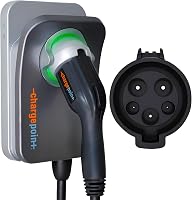
ChargePoint HomeFlex: for drivers who use the ChargePoint app
HomeFlex offers adjustable current from 16A to 50A, reminders and charging information in the ChargePoint app. The app also helps locate public stations, which suits drivers who want those functions alongside home controls.
Its cold-resistant cable and indoor or outdoor installation options make it worth comparing for a driveway. Some functions and troubleshooting require Wi-Fi, so skip it if your decision depends on connected features where coverage is poor.
The included cable is shorter than the Emporia cables here. Measure the parking route before choosing, and do not treat the slightly higher maximum current as a reason to change an otherwise suitable installation plan.
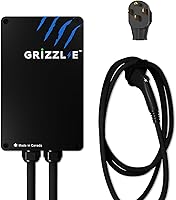
Grizzl-E: for exposed parking and offline charging
The Grizzl-E alternative pairs a cast aluminum enclosure with charging that works without an online connection. Wi-Fi adds schedules, energy statistics and remote controls.
Choose it when enclosure material and basic charging without internet access are priorities. Its multi-charger power distribution can also matter when planning more than one station, but that is a separate requirement from managing total household demand.
Skip it if you need a plug-in unit. Premium OCPP features also have a one-time activation fee, so identify whether you need those functions before making them part of your comparison.
For a closer comparison, see our Emporia vs ChargePoint guide. If the connection type is undecided, review hardwired and plug-in chargers first.
What setup and care habits prevent charging problems?
Keep the cable supported, connector clean and charging controls simple. These habits protect the parts you handle daily and make missed charging sessions easier to diagnose.
After installation, have the electrician walk you through the approved current setting, normal indicators and fault response. Keep the installation details and warranty information where you can find them.
Run a normal charging session before relying on an overnight schedule for an early trip. Confirm that charging starts during the intended window and that the vehicle's own settings allow it.
Store the cable in loose loops and return the handle to its holster. Avoid tight bends, dragging the connector and closing doors over the cable.
Inspect the cable and handle for damage during normal use, and follow Emporia's cleaning instructions. If you notice unusual heat, a burning smell, damaged insulation or repeated electrical trips, stop charging and have the cause checked.
Do not repeatedly reset a tripping breaker or raise the current setting to chase faster charging. Keep changes to electrical limits with the installer, who can confirm what the circuit supports.
Should you choose the Emporia Pro EV charger?
Choose the Emporia Pro EV charger when load management solves a real installation need and you want household energy monitoring. Get a quote covering the charger, Vue installation and PowerSmart configuration before making the decision.
Choose the standard Emporia if your home has sufficient capacity and schedules cover your routine. Favor ChargePoint for its app experience or Grizzl-E for its metal enclosure and ability to charge without an online connection.
Your next step is to confirm the vehicle connector, cable route and electrical plan. Compare other hardwired Level 2 chargers if the installation type is settled, or use our best home EV charger guide to compare the broader options.
Frequently asked questions
What makes the Emporia Pro different from the regular Emporia charger?
The Pro adds PowerSmart load balancing and an included Vue Home Energy Monitor. The regular hardwired Emporia already provides app scheduling and charging energy data, so the Pro's main reason to buy is managing household electrical demand, with broader energy monitoring as an added benefit.
Can the Emporia Pro work with a limited electrical panel?
Yes, PowerSmart is designed to manage charging around household electrical demand; Emporia says this can help avoid a panel upgrade, but your electrician must confirm that the service, panel, branch circuit and monitoring arrangement support the installation. Load management does not replace suitable wiring or required electrical protection.
Is the Emporia Pro a plug-in charger?
The model reviewed here is hardwired; Emporia also offers a NEMA 14-50 Pro configuration, which has a lower maximum charging current than the hardwired version. Choose the connection type before arranging installation, since an outlet-based setup and a direct connection have different equipment and circuit requirements.
Does the Emporia Pro use J1772 or NACS?
This model uses J1772, while Emporia offers a separate NACS configuration; match the charger to your vehicle's actual charge port rather than its brand alone. If you plan to use an adapter, confirm that the vehicle and charger manufacturers support the adapter for AC home charging.