ChargePoint Home Flex Review: Worth It? (October 2026)
Our ChargePoint Home Flex review finds it best suited to drivers who want app controls and charging reminders. Choose the hardwired version for a new permanent installation, or the NEMA 14-50 version when an electrician approves your existing outlet.
On this page (8 sections)
- ChargePoint Home Flex review: who should buy it?
- Should you get the hardwired or plug-in Home Flex?
- How much charging power do you actually need?
- How does Home Flex compare with Grizzl-E and Emporia?
- What should you check before ordering Home Flex?
- How should you set up Home Flex after installation?
- How do you care for the cable and avoid charging mistakes?
- ChargePoint Home Flex review: which version should you choose?
The ChargePoint Home Flex is a good choice for drivers who want app controls, reminders and charging information at home. This ChargePoint Home Flex review focuses on the decision that matters most: choosing a connection your home can support and features you'll actually use.
The hardwired model suits a permanent installation, while the plug-in model makes sense when you already have a suitable outlet. Neither choice should come before checking your vehicle, parking position and electrical capacity.
ChargePoint Home Flex review: who should buy it?
Buy the Home Flex if you want phone-based charging controls and a choice between hardwired and plug-in installation. Skip it if your main need is household load management, or if a simpler charger already covers your routine.
Its appeal is the combination of charging controls, reminders and access to charging information through the ChargePoint app. Those tools suit someone who wants to check charging from a phone rather than rely only on the vehicle's display.
An existing ChargePoint app user may also appreciate keeping home charging information and public station searches together. That convenience does not increase the charging power available from your house.
ChargePoint Home Flex review: the hardwired model
The hardwired Home Flex is the better fit for a new permanent charging location, especially when an electrician is already running a circuit. Its adjustable output lets the installer match the charger to the approved electrical setup.
ChargePoint HomeFlex 50A Hardwired Charger: Best for permanent garage setups
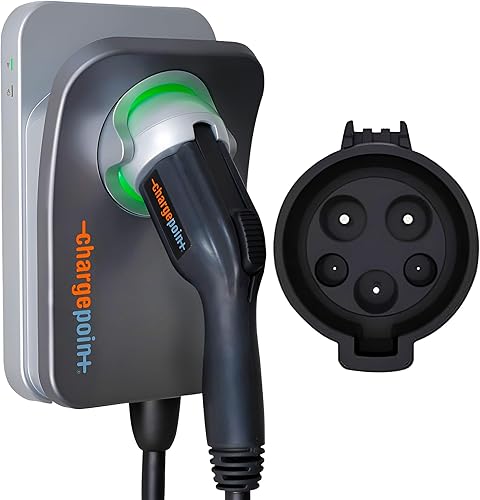
- Adjustable 16–50A output
- J1772 connector
- App controls and reminders
- Indoor or outdoor installation
Choose this Home Flex for a permanent installation with app controls and adjustable output. An electrician must match its charging setting to your home's electrical capacity.
Pros
- Adjustable output for the installed circuit
- App controls and charging information
- ChargePoint says it is UL certified
- Cold-resistant cable
Cons
- Needs hardwired installation by an electrician
- Wi-Fi is needed for some features and troubleshooting
- Tesla vehicles require a suitable adapter
Choose this version if you expect to keep the charger in the same place and want the option of higher output where your car and circuit support it. Hardwiring also removes the wall receptacle connection from the installation.
Skip it if you need a charger that can be unplugged for removal. Moving a hardwired unit involves electrical work, so think about an expected house move before choosing the connection style.
What the app adds to daily charging
The app provides charger controls, reminders and charging data, plus connections with smart home devices. Some Home Flex functions and troubleshooting steps need Wi-Fi, so check signal strength at the planned mounting spot.
Decide what you want the phone controls to do before buying. If your car already handles your charging routine well, reminders and another charging display may offer less value to you.
Public station search is useful when planning trips, but assess it separately from home charging. Your home circuit, vehicle and charging window still determine how much energy you can add overnight.
Confirm the connector before choosing either version
Both Home Flex models here use J1772, so Tesla vehicles need a suitable adapter. Other EV buyers should also check the actual charge port rather than choose by brand or model year alone.
Follow the vehicle manufacturer's guidance on connector and adapter compatibility. Our guide to J1772 and NACS differences explains what to check before buying a charger.
Should you get the hardwired or plug-in Home Flex?
Choose hardwired for a permanent installation or plug-in when an electrician approves a nearby NEMA 14-50 receptacle. Buying the plug-in version makes less sense if you must install an outlet solely to use it.
| Detail | Hardwired Home Flex | NEMA 14-50 Home Flex |
|---|---|---|
| Connection | Direct electrical connection | NEMA 14-50 plug |
| Maximum charging output | 50A | 40A |
| Cable length | 23 ft | 23 ft |
| Strongest fit | New permanent installation | Suitable existing outlet |
The higher output matters only if your EV can accept it and your home can supply it. For a driver who parks overnight, a lower approved setting may still replace the energy used during a normal day.
A receptacle's shape does not prove that the outlet, wiring and breaker are suitable for EV charging. Ask the electrician to assess the whole circuit, including the condition of an existing receptacle.
ChargePoint HomeFlex NEMA 14-50 Charger: Best for existing outlet setups

- NEMA 14-50 plug
- Up to 40A charging
- J1772 connector
- App controls and reminders
This version suits a home with an electrician-approved NEMA 14-50 outlet near the parking spot. It provides Home Flex app features without choosing a hardwired connection.
Pros
- Connects to a suitable existing receptacle
- App controls and charging information
- Indoor or outdoor installation
- Cold-resistant cable
Cons
- Existing outlet and circuit need assessment
- Tesla vehicles require a suitable adapter
- Lower maximum output than hardwired Home Flex
The plug-in Home Flex suits buyers whose approved outlet is already close to the parking spot. It keeps the same core app appeal while allowing the charger to be unplugged when it needs to be removed.
Skip this version if the outlet forces an awkward mounting position or leaves the cable stretched across a walkway. Plan the location first rather than allowing an inconvenient receptacle to decide where charging must happen.
Our hardwired versus plug-in EV charger guide covers the connection trade-offs in more detail.
How much charging power do you actually need?
Choose enough output to replace your daily driving during your usual parking window. Maximum amperage is useful for short charging windows, but it should not be the only reason to choose a charger.
Start with how far you usually drive and how long the car sits at home. A long overnight stay gives you more time to recharge than a brief stop between trips.
Check your vehicle's maximum AC charging rate as well. A charger with greater capacity cannot push the vehicle beyond what its onboard charging system accepts.
Avoid choosing by advertised miles added per hour alone. Vehicle efficiency and charging limits vary, so that figure cannot predict every driver's result.
Breaker size and charging output are different numbers. EV charging places a sustained load on the circuit, and the installer must select the breaker, wiring and charger setting together.
Read our guide to EV charger breaker sizing before discussing the installation. Bring your normal driving needs to that conversation so the proposed circuit serves your routine.
How does Home Flex compare with Grizzl-E and Emporia?
Choose Grizzl-E for straightforward charging or Emporia for household energy management. Home Flex fits buyers who place more value on ChargePoint's app functions and connection choices.
Grizzl-E Classic 40A NEMA 14-50 Charger: Best for simple outdoor charging
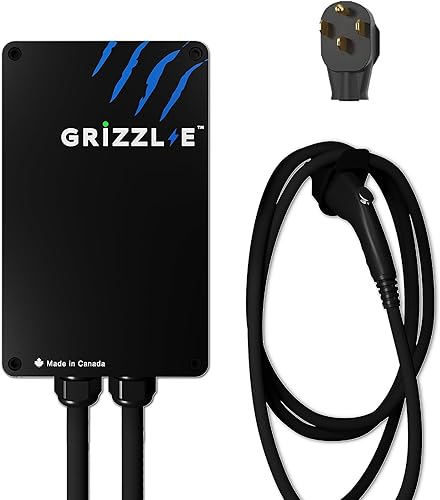
- Adjustable 16–40A output
- NEMA 14-50 plug
- 24 ft cable
- Metal enclosure
The Grizzl-E Classic suits buyers who prioritize a metal enclosure and straightforward charging. Its adjustable output must be set to match the circuit.
Pros
- 4 charging-current settings
- Metal enclosure
- Grizzl-E says it is UL certified
- Indoor and outdoor use
Cons
- Lower maximum output than hardwired Home Flex
- Full output requires a 50A circuit
The Grizzl-E Classic has a metal enclosure, a NEMA 14-50 plug and a 24 ft cable. Its 4 output settings give the installer options for matching charging current to the circuit.
Grizzl-E says it is suitable for indoor, outdoor and cold-weather use. It suits a buyer who prioritizes those physical features over the Home Flex app experience.
Skip it if your main reason for shopping is phone-based charging information or household energy monitoring. Also measure the route before treating its extra foot of cable as the solution to an awkward parking layout.
Emporia Pro 48A Hardwired Charger: Best for busy electrical panels

- 48A hardwired charging
- 25 ft cable
- Vue home energy monitor
- PowerSmart load balancing
The Emporia Pro suits households that need to manage EV charging alongside other electrical loads. It includes a Vue home energy monitor and PowerSmart load balancing.
Pros
- Includes Vue home energy monitor
- PowerSmart automatically balances load
- App scheduling and usage tracking
- Emporia provides a 3-year warranty
Cons
- Needs hardwiring for full output
- Professional installation is recommended
- Energy monitor adds installation planning
The Emporia Pro combines 48A hardwired charging with a 25 ft cable and an included Vue home energy monitor. Emporia says PowerSmart automatically balances household electrical load, making it the more relevant comparison for a home with limited spare capacity.
Its app adds charging schedules and real-time usage tracking. Choose it when understanding household demand is part of the project, and have the installer assess how the monitor and load management will fit your panel.
Skip the Pro if that extra equipment solves no problem for you. Load management still needs an installation assessment; it does not remove the need for suitable wiring and protective equipment.
Our Emporia vs ChargePoint comparison helps you weigh those features. For a wider shortlist, browse the best Level 2 EV chargers for home.
What should you check before ordering Home Flex?
Confirm connector compatibility, electrical capacity and cable reach before ordering. A charger that fits all 3 is more useful than one chosen around its highest setting.
Measure along the route the cable will actually follow, including the distance around the vehicle. Allow enough slack to connect comfortably without pulling on the charge port.
Check reach with the car parked in its normal position. If you share the space or sometimes reverse into it, measure those positions too.
Choose a mounting spot where the cable can be stored without blocking a door or walkway. Keep it away from places where tires may roll over it or a garage door could trap it.
For outdoor installation, ChargePoint says Home Flex is suitable for outdoor use and includes a cold-resistant cable. Ask the installer to address exposure, mounting and any receptacle protection required for that location.
Request an installation quote that covers the full job, including the wiring route and any panel work. Our Level 2 charger installation cost guide explains which parts of the project can change the scope.
How should you set up Home Flex after installation?
Let the electrician confirm the charging-current setting, then follow the ChargePoint app instructions. Do not raise the setting later simply because the app or charger offers a higher option.
Keep a record of the approved setting and circuit information. This helps if someone changes app settings or you need support later.
Decide where your charging schedule will live: in the car or in any charger controls you use. Overlapping schedules can leave both systems waiting for permission to start.
After setup, connect the vehicle and check that it reports charging as expected. If it does not, check the car's charge limit and schedule before changing electrical settings.
Where your utility offers time-based rates, confirm the actual lower-rate window and any enrollment conditions. Set your routine around that window only if it still leaves enough time for your next trip.
ChargePoint provides 24/7 support. Have the charger model, vehicle details and any error message ready when asking for help.
How do you care for the cable and avoid charging mistakes?
Store the cable in loose loops without strain and keep the connector clear of dirt and vehicle traffic. Follow ChargePoint's care instructions rather than using solvents or forcing a stiff cable into tight bends.
Look for cuts, damaged connector parts, discoloration or a loose wall connection during normal use. Stop charging and seek qualified help if you notice damage, a burning smell or unusual heat.
Do not repeatedly reset a tripping breaker to keep charging. A recurring trip needs diagnosis, not a higher breaker or a higher charger setting.
Avoid using an extension cord to make an unsuitable mounting location work. Plan a direct connection with enough cable reach from the start.
A cold-resistant cable still needs sensible handling. Avoid pulling the charger by its cable or using the connector as a handle when moving stored loops.
If charging stops at the same battery percentage each time, check the vehicle's charge target first. If it stops at the same time of day, check schedules before assuming the charger has failed.
ChargePoint Home Flex review: which version should you choose?
This ChargePoint Home Flex review favors hardwired for a new permanent setup and plug-in for a suitable existing outlet. Choose only after the electrician confirms capacity and you confirm the cable reaches your normal parking position.
Pick Emporia Pro when managing household electrical demand is central to the job. Pick Grizzl-E Classic when its metal enclosure and straightforward charging better match your priorities.
Before ordering, settle 3 details: the connection style, the approved charging setting and the mounting location. For help placing those choices in a broader plan, read our home EV charging guide.
Frequently asked questions
Is the ChargePoint Home Flex worth considering?
The Home Flex is worth considering if you want app controls, charging reminders and charging information in one place. Choose the connection style around your home's electrical setup, then confirm vehicle compatibility and cable reach before ordering; those checks matter more than buying the highest available output.
What is the difference between the hardwired and plug-in Home Flex?
The hardwired Home Flex supports up to 50A, while the NEMA 14-50 version supports up to 40A through a suitable receptacle. Both reviewed versions have a J1772 connector and app features, so the main decision is which connection your electrician recommends for your circuit and parking location.
Does ChargePoint Home Flex work with Tesla?
These J1772 Home Flex versions require a suitable adapter for Tesla vehicles. Check your vehicle manual for the approved adapter and charging requirements before ordering, and include the adapter in your cable-reach planning so the connection sits comfortably without pulling on the vehicle's charge port.
Can ChargePoint Home Flex be installed outdoors?
ChargePoint says both reviewed Home Flex versions can be installed indoors or outdoors by an electrician, and both include a cold-resistant cable. The installer should choose a suitable mounting location and wiring route, with any outdoor receptacle protected as required and the cable kept clear of vehicle traffic.