Grizzl-E vs ChargePoint Home Flex: Which Is Better? (October 2026)
For Grizzl-E vs ChargePoint, choose Grizzl-E for a simple charging routine or ChargePoint for phone controls and charging data. Let circuit capacity, connector fit and parking layout settle the final choice.
On this page (11 sections)
- Grizzl-E vs ChargePoint: which fits your routine?
- What differences matter before you buy?
- How much charging power do you actually need?
- Will the cable reach your car comfortably?
- Are ChargePoint's app features worth choosing it for?
- Will either charger connect to your vehicle?
- What should happen before the first charging session?
- How should you care for an indoor or outdoor charger?
- Which common buying mistakes should you avoid?
- How do the two models compare as purchases?
- Grizzl-E vs ChargePoint: make the final choice
For Grizzl-E vs ChargePoint, choose Grizzl-E if you want a simple home charging routine; choose ChargePoint Home Flex if you'll use phone controls, reminders and charging data. Your car and electrical installation matter more than either brand's advertised charging speed.
These are the NEMA 14-50 plug-in versions, so start by checking the outlet, cable route and vehicle connection. Once those fit, the choice comes down to how you want to manage charging each day.
 Best for simple charging routines
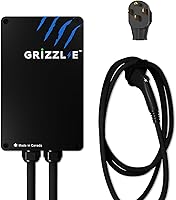
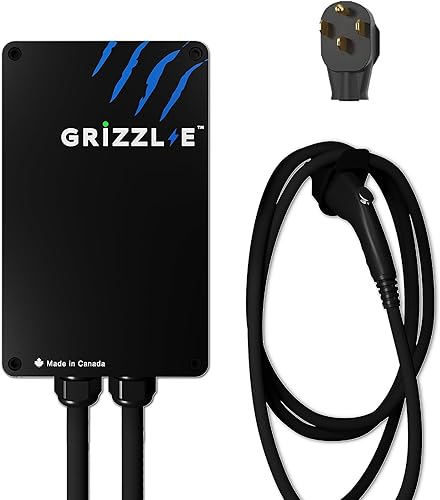
Grizzl-E Classic 40A NEMA 14-50 Charger
 Best for connected charging routines
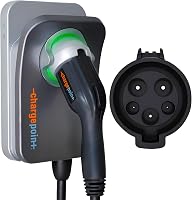
ChargePoint HomeFlex NEMA 14-50 Charger
Grizzl-E vs ChargePoint: which fits your routine?
Grizzl-E suits drivers who prioritize straightforward charging, while ChargePoint suits drivers who want to manage charging through an app. Buy the features that solve a daily need, rather than choosing by the longest feature list.
If you arrive home, connect the car and leave it parked overnight, Grizzl-E is the stronger starting point. Its adjustable output gives your electrician several settings to match an approved installation.
ChargePoint makes more sense if you want charging information on your phone or reminders that support your routine. Its public station tools may also help if you regularly charge away from home.
Neither charger needs to refill the entire battery every night to be useful. Most daily charging replaces the energy used since the previous session, so start with your normal driving and parking time.
Grizzl-E vs ChargePoint: who should skip each one?
Skip Grizzl-E if phone-based charging management is a must-have. ChargePoint is the supported choice here for app controls, charging data and smart home connections.
Skip ChargePoint if those tools won't change how you charge. Also reconsider this J1772 version if you want a direct vehicle connection and your car would require an adapter.
Skip both plug-in versions if your electrician recommends a different connection or your parking layout leaves the cable stretched across a walkway. Solve those fit problems before choosing a brand.
What differences matter before you buy?
App features, cable reach and installation flexibility separate these chargers more clearly than peak output. Both plug-in models can supply up to 40A when the installation and vehicle support it.
| Feature | Grizzl-E Classic | ChargePoint Home Flex |
|---|---|---|
| Home connection | NEMA 14-50 plug | NEMA 14-50 plug |
| Cable length | 24 ft | 23 ft |
| Output for these versions | 16A, 24A, 32A or 40A | Up to 40A |
| Main reason to choose it | Adjustable output and metal enclosure | App controls, reminders and charging data |
| Vehicle connection details | Confirm connector and adapter needs for your car | J1772; Tesla vehicles require an adapter |
| Installation location | Indoor or outdoor | Indoor or outdoor |
| Certification | Grizzl-E identifies it as UL certified | ChargePoint identifies it as UL certified |
Treat this as a comparison of specific versions, not every charger sold under these names. A different plug or vehicle connector can change whether a charger fits your home.
If you're still deciding what kind of home charger to buy, start with our home EV charger guide. It helps you work through the car, parking and electrical questions before narrowing the brand.
How much charging power do you actually need?
Choose enough power to replace your normal driving during your usual parking window. The highest available setting is useful only when your car can accept it and your home can supply it.
A driver parked overnight has more time to recharge than someone who returns late and leaves early. A plug-in hybrid with a smaller battery may also have different needs from an EV covering a long daily commute.
Check your vehicle's maximum AC charging rate in its manual. A more powerful wall charger cannot push the car beyond that limit.
Grizzl-E pairs its 40A, 32A, 24A and 16A settings with 50A, 40A, 30A and 20A breakers, respectively. These are installation choices to discuss with an electrician, not permission to use any outlet on a matching breaker.
For ChargePoint, this NEMA 14-50 version requires a 40A or 50A circuit. Its output must be configured to suit the approved circuit.
A breaker number isn't the charging output. Don't interpret a 50A circuit requirement as permission to draw that much continuously through either plug-in model.
Our guide to Level 2 charger amperage explains how charging current relates to daily use. Ask your electrician to assess panel capacity before committing to a higher-power installation.
Why miles added per hour can mislead you
Compare electrical output and your car's charging limit before advertised range gains. Miles added per hour depend on the vehicle's energy use, so figures based on different cars don't establish a speed winner.
Cold conditions, battery temperature and the car's charging controls can also affect a session. For planning, leave some margin rather than building your routine around a best-case range estimate.
Will the cable reach your car comfortably?
Measure the actual cable route to the charge port, including bends and enough slack to connect without tension. The length difference in the table matters only if it changes where you can safely park.
Use a length of string to trace the route from the proposed charger position. Account for the unit's mounting location, obstacles and the side of the vehicle where the port sits.
Check both forward and reverse parking if you use both. In a shared garage, confirm that another parked car won't block access to the cable or charging port.
Keep the route clear of tires, garage doors and regular foot traffic. Don't plan an installation that requires an extension cord to bridge the final gap.
The supply cord must also reach the receptacle as directed in the installation instructions. Extra vehicle-cable reach doesn't solve an outlet mounted in the wrong place.
Before relying on an existing socket, read our guide to charging from a NEMA 14-50 outlet. A matching receptacle needs a proper electrical assessment before it becomes part of your charging plan.
Are ChargePoint's app features worth choosing it for?
Choose ChargePoint if reminders, phone controls and charging information will help you manage real charging habits. Its app also supports smart home connections and helps you find public stations.
Reminders are useful if plugging in is easy to forget after an irregular day. Charging information can help you review sessions rather than relying only on the battery percentage shown when you enter the car.
Drivers who use public charging may value having station information in the same app. Access to station information doesn't mean public sessions are included with the home charger.
Before buying for connected features, check phone compatibility, account requirements and connectivity at the mounting location. Ask ChargePoint which functions need an internet connection if your garage has weak coverage.
Also check what your car already lets you manage. If vehicle controls already cover your needs, decide whether another app adds enough convenience to justify choosing around it.
When using charging schedules, make the car and charger settings agree. Conflicting schedules can leave a car connected during a period when neither system allows charging.
Will either charger connect to your vehicle?
Check the vehicle connector separately from the wall plug. NEMA 14-50 describes the connection to your home's outlet, not the connection to your car.
This ChargePoint model uses J1772, and ChargePoint specifies an adapter for Tesla vehicles. Grizzl-E describes the Classic as compatible with North American EVs and plug-in hybrids, but confirm your exact connection needs before ordering.
Don't assume an adapter is included merely because a charger can work with your car. Verify the correct adapter and follow the vehicle and adapter instructions for use.
Our guide to NACS and J1772 adapters explains when an adapter is needed. Check the actual charge port rather than relying only on the vehicle brand.
For a household with 2 EVs, assess each car separately. These chargers serve one connected vehicle at a time, so also plan when each driver will need access.
What should happen before the first charging session?
Have an electrician approve the circuit, outlet and mounting plan before using either charger. ChargePoint specifically requires licensed electrician installation for Home Flex.
An existing receptacle can reduce the work needed, but its presence doesn't settle the condition of the wiring or available panel capacity. Tell the electrician how long the car usually stays parked and where its charge port sits.
Ask for the charger output to be set for the approved installation. Keep a record of that setting so a later move or electrical change doesn't turn into guesswork.
For Grizzl-E, follow the exact instructions for setting current. Don't open the unit or change internal settings while it is energized.
After ChargePoint is installed, download the app and follow its setup instructions. Check that the configured charging arrangement matches what the electrician approved.
For either model, confirm that the car recognizes the connection and that any charging schedule is set as intended. Learn the normal status indicators from the manual before relying on unattended overnight sessions.
Use the EV charger installation cost guide to plan the work. If the outlet needs replacing or relocating, compare the full installation with a hardwired vs plug-in EV charger setup before proceeding.
How should you care for an indoor or outdoor charger?
Store the connector properly and check the cable and outlet area for damage. Both models support outdoor installation, but the entire setup still needs a suitable location and correct mounting.
Grizzl-E has a metal enclosure, and the brand gives it an IP67 water-resistance rating. ChargePoint includes a cold-resistant cable.
Neither detail makes cable placement unimportant. Keep the connector out of standing water and avoid locations where a vehicle could strike the charger.
Loop the cable loosely for storage, following the manual's guidance. Don't trap it under a tire, bend it sharply around a corner or use it to support other objects.
Inspect for cracked insulation, damaged connector parts, discoloration or a loose wall receptacle. Stop charging if you notice damage, a burning smell or unusual heat, and have the cause checked before resuming.
Keep the charger mounted rather than repeatedly unplugging it as part of daily use. If you need to disconnect it from the wall, follow its instructions and end the vehicle's charging session first.
Grizzl-E includes built-in GFCI, electrical protections and power outage recovery. These features support operation, but repeated trips or faults still need attention rather than repeated resets.
Which common buying mistakes should you avoid?
Avoid choosing by headline amperage before checking the car and installation. That mistake can leave you paying for capability your routine cannot use.
- Confusing Home Flex versions: this plug-in model doesn't provide the higher output ChargePoint offers through its hardwired version.
- Measuring in a straight line: cable routing needs room for bends, parking variation and slack at the connector.
- Treating lower current as an outlet repair: reducing output doesn't fix damaged hardware or incorrect wiring.
- Assuming compatibility means no adapter: check both the vehicle connector and any required adapter.
- Buying app tools without a use for them: identify the task each feature will help you do.
- Ignoring the parking window: reliable overnight access can matter more than chasing the highest charging rate.
For either model, settle these questions before installation day. Moving a mounting point or correcting the planned connection is easier before the electrical work is complete.
How do the two models compare as purchases?
Grizzl-E earns 9.1 for its fit with simple home charging needs; ChargePoint earns 8.8 for buyers who value connected tools. The higher score doesn't make Grizzl-E the right choice for someone who needs app controls.
| Product | Best for | Connection | Cable | Output | Our score |
|---|---|---|---|---|---|
| Grizzl-E Classic 40A NEMA 14-50 Charger | simple charging routines | NEMA 14-50 plug | 24 ft | 16A, 24A, 32A or 40A | 9.1 |
| ChargePoint HomeFlex NEMA 14-50 Charger | connected charging routines | NEMA 14-50 plug | 23 ft | Up to 40A with this plug-in version | 8.8 |
Grizzl-E Classic 40A NEMA 14-50 Charger: 9.1
Grizzl-E is the better match when physical fit and an approved current setting cover your main needs. Its metal enclosure and power outage recovery add practical reasons to consider it for a fixed home charging spot.
Choose it with a clear installation plan rather than as a workaround for limited electrical capacity. If phone-based management drives your buying decision, move to ChargePoint.
ChargePoint HomeFlex NEMA 14-50 Charger: 8.8
ChargePoint is the better match when charging information and reminders will become part of your routine. It gives you a reason to choose beyond the wall connection itself.
Its value is strongest when you'll use those tools regularly. Before buying, resolve vehicle-adapter needs and any connectivity questions that could limit the features you want.
Grizzl-E vs ChargePoint: make the final choice
Pick Grizzl-E if your electrician approves the installation and your goal is a straightforward daily charging routine. Pick ChargePoint if you can name app features you'll use each week and have confirmed the vehicle connection.
Before ordering, settle 3 points: the approved circuit, the cable route and the car's connector. Those checks turn a brand preference into a charger that fits your home.
For model-specific detail, read the Grizzl-E Classic review or ChargePoint Home Flex review. If connected controls remain your priority, our ChargePoint Home Flex vs Emporia comparison is the next useful comparison.
Frequently asked questions
Which is better, Grizzl-E or ChargePoint Home Flex?
Choose Grizzl-E for a simple home charging routine where adjustable current and cable reach matter most; choose ChargePoint Home Flex if you'll use phone controls, reminders and charging data regularly. Neither is the better buy if its connection, cable route or electrical requirements don't fit your home and vehicle.
Does Grizzl-E or ChargePoint have a longer cable?
Grizzl-E has a 24 ft cable, compared with 23 ft for this ChargePoint Home Flex. Measure the full route to your charge port, including bends and slack, rather than the straight distance; the extra foot only helps if it lets you connect without pulling the cable tight.
Can both chargers work with a Tesla?
ChargePoint's J1772 model requires an adapter for Tesla vehicles; Grizzl-E describes the Classic as compatible with North American EVs and plug-in hybrids, but you should still confirm the connection and any adapter needed for your car. Check vehicle-specific guidance rather than assuming broad compatibility means a direct connection.
What circuit does each charger need?
Grizzl-E specifies 50A, 40A, 30A and 20A breakers for its respective 40A, 32A, 24A and 16A settings; ChargePoint's NEMA 14-50 version requires a 40A or 50A circuit. An electrician must confirm the complete installation, including wiring, receptacle, panel capacity and the correct output setting.
Do you need an electrician to install these chargers?
ChargePoint requires a licensed electrician for Home Flex installation. For either charger, have an electrician assess the circuit and outlet before use, including an existing receptacle; a matching plug shape doesn't establish that the wiring, panel capacity or receptacle condition is suitable for hours of EV charging.